ForumSpark Support
Preview: https://prnt.sc/7eND-kR2pgmd
Overview:
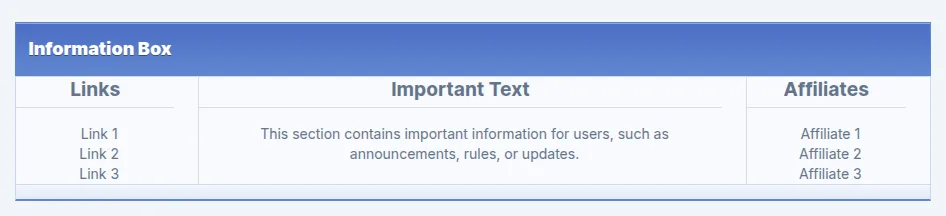
This code creates an "Information Box" component for your forum, which can be used to display key sections like links, important announcements, and affiliate information in a structured, visually separated layout.
Links Section: Displays a list of links (e.g., forum-related pages or external links).
Important Text Section: A central area where you can put announcements, rules, or any other important messages for users.
Affiliates Section: Lists affiliate partners or other external entities you want to highlight.
Customization:
- The layout is responsive and adjusts the sections’ widths. The links and affiliates sections each take up 20% of the width, while the important text section takes up 60%, ensuring the message is the focal point. But you can change this to 33% each.
- Each section has its own heading and list of items (links or affiliates) that can be easily updated.
Usage:
Where to place: The code should be placed in the theme layout between the <!-- TOPMENU --> and <!-- NAV --> comments, ensuring it displays above the main navigation but below the top menu.
Why use it: This component is ideal for displaying important information to users in a clean and organized manner, such as news, rules, or affiliate partnerships.
It’s flexible enough to be adapted or expanded based on what content you need to display to your forum members.
<br><br>
<div class="panel" style="width: 67%; margin: 0 auto; text-align: center;">
    <div class="panel__title" style="margin-top: 2px; font-size: 1.125rem; line-height: 1.75rem; font-weight: 600; text-shadow: 0 1px 0 rgba(0, 0, 0, .4);"><b>Information Box</b></div>
    <div x-show="! collapsed" class="panel__content panel__content--flush">
        <div class="forum__description" style="display: flex; flex-wrap: wrap; justify-content: space-between; box-sizing: border-box;">
            <!-- Links Section -->
            <div style="flex: 1 1 20%; padding-right: 1.5rem; border-right: 1px solid #ddd; box-sizing: border-box;">
                <h3 style="text-align: center; font-size: 1.2rem; font-weight: bold; margin-top: 2px; margin-bottom: 1rem; border-bottom: 1px solid #ddd; padding-bottom: 0.5rem;">Links</h3>
                <ul style="list-style: none; padding-left: 0.5rem; margin: 0;">
                    <li><a href="#link1">Link 1</a></li>
                    <li><a href="#link2">Link 2</a></li>
                    <li><a href="#link3">Link 3</a></li>
                </ul>
            </div>

        <!-- Text Section -->
        <div style="flex: 1 1 60%; padding-right: 1.5rem; border-right: 1px solid #ddd; box-sizing: border-box;">
            <h3 style="text-align: center; font-size: 1.2rem; font-weight: bold; margin-top: 2px; margin-bottom: 1rem; border-bottom: 1px solid #ddd; padding-bottom: 0.5rem;">Important Text</h3>
            <p style="margin: 1rem; padding-left: 0.5rem;">This section contains important information for users, such as announcements, rules, or updates.</p>
        </div>

        <!-- Affiliates Section -->
        <div style="flex: 1 1 20%; padding-right: 1.5rem; box-sizing: border-box;">
            <h3 style="text-align: center; font-size: 1.2rem; font-weight: bold; margin-top: 2px; margin-bottom: 1rem; border-bottom: 1px solid #ddd; padding-bottom: 0.5rem;">Affiliates</h3>
            <ul style="list-style: none; padding-left: 0.5rem; margin: 0;">
                <li><a href="#affiliate1">Affiliate 1</a></li>
                <li><a href="#affiliate2">Affiliate 2</a></li>
                <li><a href="#affiliate3">Affiliate 3</a></li>
            </ul>
        </div>
    </div>
</div>
<div x-show="! collapsed" class="panel__footer"></div>
</div>

<style>
    /* Ensure that the sections wrap and adjust width on smaller screens */
    @media (max-width: 768px) {
        .forum__description {
            display: block;
        }
        .forum__description > div {
            max-width: 100%;
            flex: 1 1 100%;
            margin-bottom: 1rem;
        }
    }
</style>