Back to feed
ForumSpark Support Themes & Extensions Join

Credits & Shop

Cedric · 6 months ago · 23 replies · 153

Add a complete virtual currency economy to your forum.

Features

  • Earning Triggers: Award credits for posting, creating topics, receiving reactions, daily logins, and more

  • Item Shop: Sell cosmetic items like username styles, titles, and group access

  • Gifting: Let members send credits to each other with optional tax

  • Leaderboard: Show top earners across your community

  • Group Multipliers: Reward VIP groups with bonus earning rates

  • Admin Controls: Full settings panel, shop manager, and transaction log

  • Widgets: Including 5 widgets

This is now available in your ACP Extensions Directory => Browse Extensions => Install Credits & Shop

This marks our first initial credits & shop release. More is coming soon! 🙂

For feedback, requests, or bugs, please use this topic to inform me.

23 replies
Daedalus · 6 months ago

Hey man,

I installed this on a demo forum I'm playing around on, tweaked the earning triggers and nothing has worked save the achievement trigger.

Cedric OP · 6 months ago

On Apr 14, 2026, Daedalus said:

Hey man,

I installed this on a demo forum I'm playing around on, tweaked the earning triggers and nothing has worked save the achievement trigger.

Thanks. Have verified this. Will be fixed this week.

Daedalus · 6 months ago

On Apr 15, 2026, Cedric said:

Thanks. Have verified this. Will be fixed this week.

No problem! Happy to help.

Cedric OP · 6 months ago

On Apr 15, 2026, Daedalus said:

No problem! Happy to help.

This has been fixed.

Daedalus · 6 months ago

On Apr 19, 2026, Cedric said:

This has been fixed.

I just tried making a new thread and it didn't award credits to my account for it.

Cedric OP · 6 months ago

On Apr 19, 2026, Daedalus said:

I just tried making a new thread and it didn't award credits to my account for it.

Hmm, weird. I'll look into it.

Daedalus · 6 months ago

Yeah, I made another new thread in a different forum just to verify it wasn't an issue with the forum itself and it still didn't award any credits for the thread.

Cedric OP · 6 months ago

On Apr 19, 2026, Daedalus said:

Yeah, I made another new thread in a different forum just to verify it wasn't an issue with the forum itself and it still didn't award any credits for the thread.

Yeah, I pushed a fix, should be good to go now. 🙂

Daedalus · 6 months ago

Seems to be working now, thanks!

B
Bright · 6 months ago

This credits system is very interesting but it can disrupt the forum if not controlled 😅Once money-like system is attached to a forum, some people would spam post just to farm points. I have seen it happen on many forums.

Gizmo · 5 months ago

Is there a way to add icons so people can purchase icons for their profiles/posts?

Eclipse · 4 months ago

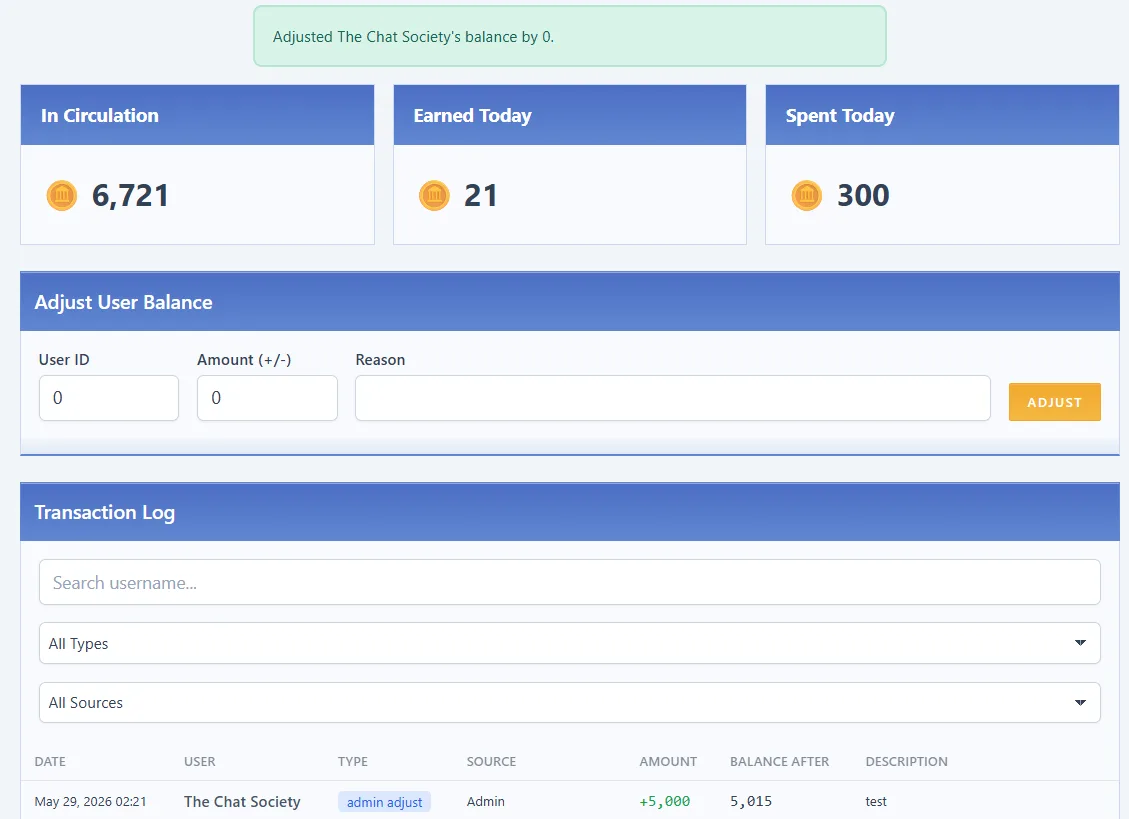
Just noticed this bug, when adding credits to a user manually via ACP, the notification says their balance was adjusted by 0 instead of the amount given:

Eclipse · 4 months ago

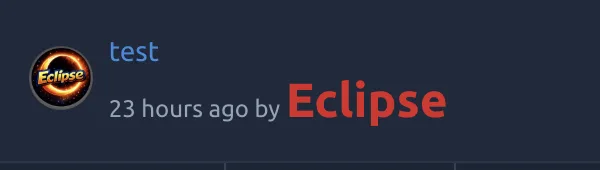
Also having trouble with username styles for the credit shop. I added a 'Bold Username' item in the shop, and when purchased, the name does not change. Currently using this for css: font-weight: 700;

NeoMetallix · 4 months ago

Yeah I'm not really understanding how it works.

Under Custom CSS I put:

.sparkles {background:url(https://sonicblast.org/images/stars.gif) repeat scroll 0 0%;color:#b76db7;font-size:13px;padding:3px 10px;font-family:Andes;text-shadow:2px 3px 0px #430ed5;}

So in the item for the shop, do I just put in .sparkles in the shop manager for .css class?

Eclipse · 4 months ago

On May 30, 2026, IntellectualLiberation said:

Yeah I'm not really understanding how it works.

Under Custom CSS I put:

.sparkles {background:url(https://sonicblast.org/images/stars.gif) repeat scroll 0 0%;color:#b76db7;font-size:13px;padding:3px 10px;font-family:Andes;text-shadow:2px 3px 0px #430ed5;}

So in the item for the shop, do I just put in .sparkles in the shop manager for .css class?

I was able to figure it out, it's the same as user group customization for special effects.

For example, if you want to sell a shop item for bold usernames:

In your theme's CSS style sheet, put

.username-bold {
    font-weight: 700;
}

Then all you have to do in the shop is put username-bold in the CSS Class field

NeoMetallix · 4 months ago

On May 30, 2026, Eclipse said:

I was able to figure it out, it's the same as user group customization for special effects.

For example, if you want to sell a shop item for bold usernames:

In your theme's CSS style sheet, put

.username-bold {
    font-weight: 700;
}

Then all you have to do in the shop is put username-bold in the CSS Class field

Didn't work for me. That's essentially what I did earlier. I put the code in and when I go to the CSS selector I see this:

<a href="https://money.forumspark.net/users/moneyman" class="username username--25  a.username-bold">
<b><span style="color:#d2a00a">MoneyMan</span></b></a>

It puts the bold class there but doesn't do anything. Idk what I'm doing wrong. @Cedric any insights? Eclipse has it working but what they did is the same thing I did initially. This is all just a test for me now, I'm not sure what I want to do with the shop yet.

Eclipse · 4 months ago

On May 30, 2026, IntellectualLiberation said:

Didn't work for me. That's essentially what I did earlier. I put the code in and when I go to the CSS selector I see this:

<a href="https://money.forumspark.net/users/moneyman" class="username username--25  a.username-bold">
<b><span style="color:#d2a00a">MoneyMan</span></b></a>

It puts the bold class there but doesn't do anything. Idk what I'm doing wrong. @Cedric any insights? Eclipse has it working but what they did is the same thing I did initially. This is all just a test for me now, I'm not sure what I want to do with the shop yet.

Can you screenshot the code from your CSS stylesheet and the CSS class value you have in the shop

NeoMetallix · 4 months ago

On May 30, 2026, Eclipse said:

Can you screenshot the code from your CSS stylesheet and the CSS class value you have in the shop

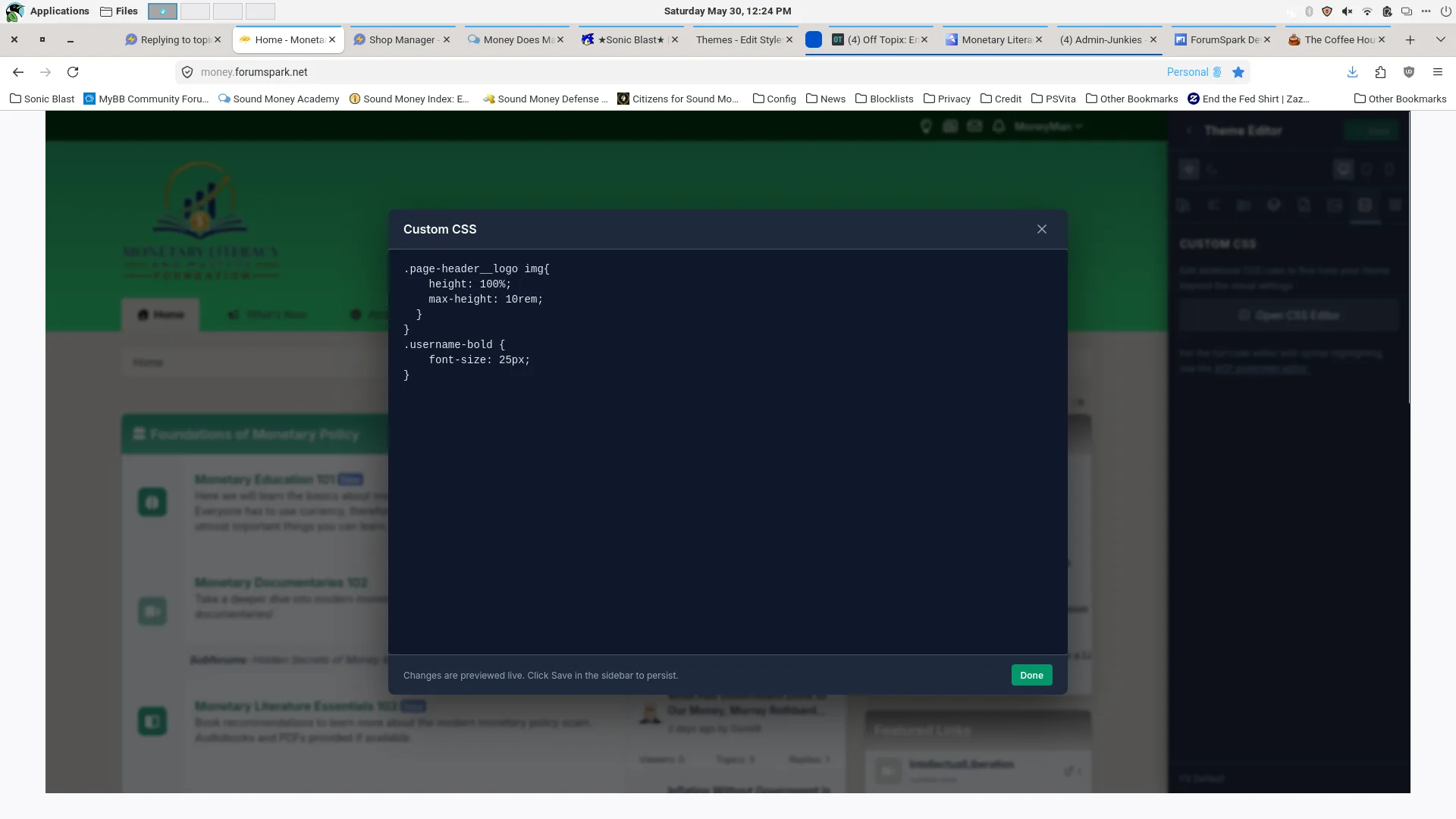
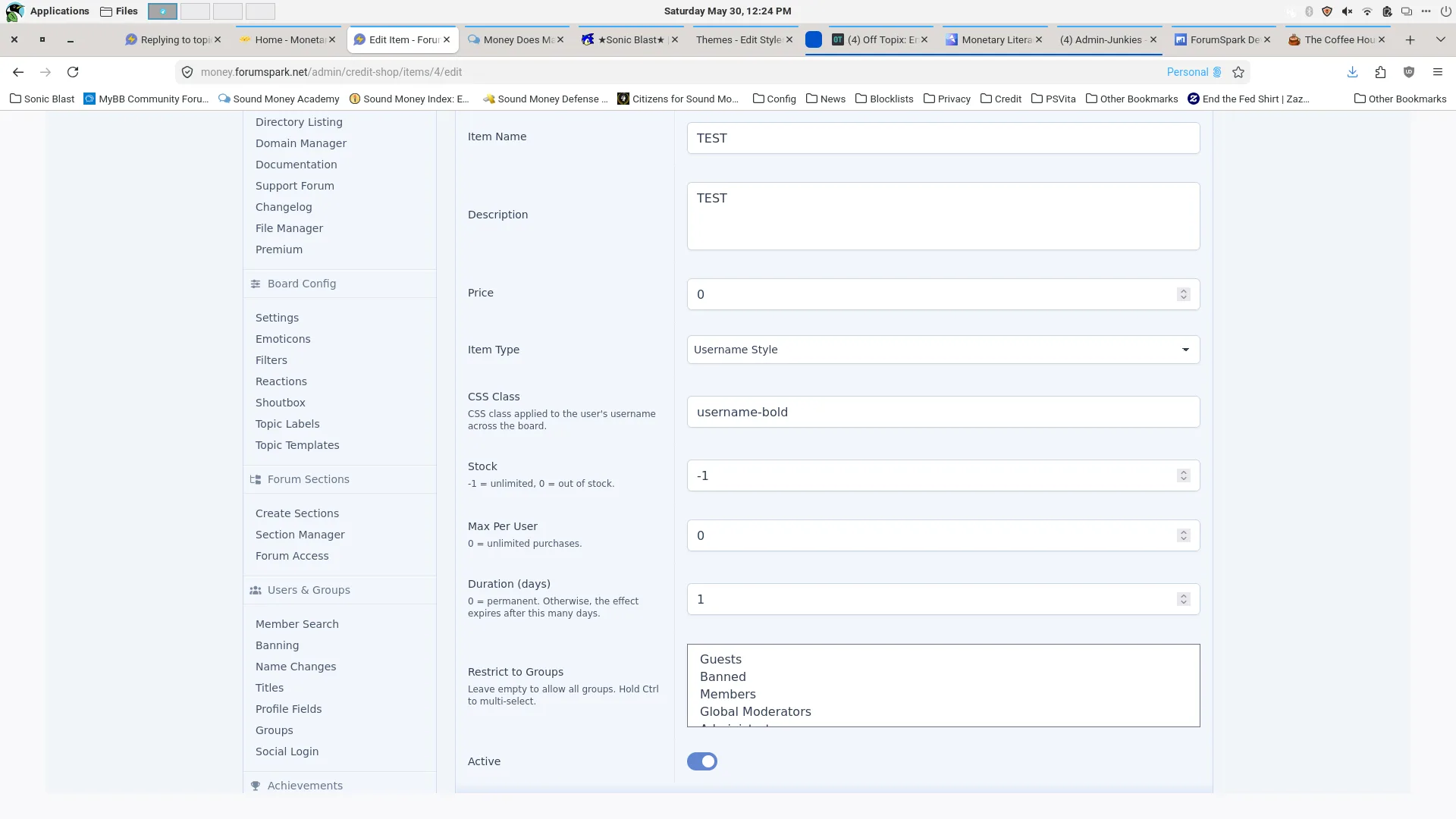
For the CSS, I gave it a larger font size since admins are already bold just as a test. It should be working. My original should be working too, I did it the same way you posted and I even copied and pasted what you put for the bold exact and nothing.

Eclipse · 4 months ago

On May 30, 2026, IntellectualLiberation said:

For the CSS, I gave it a larger font size since admins are already bold just as a test. It should be working. My original should be working too, I did it the same way you posted and I even copied and pasted what you put for the bold exact and nothing.

Hmm, that's strange. I just added a line to mine for font-size 24px to test, and it's working properly.

Make sure you are purchasing the shop item in the shop to test it out, from my experience it won't update automatically for people who have already purchased it

NeoMetallix · 4 months ago

On May 31, 3026, Eclipse said:

Hmm, that's strange. I just added a line to mine for font-size 24px to test, and it's working properly.

Make sure you are purchasing the shop item in the shop to test it out, from my experience it won't update automatically for people who have already purchased it

Okay, got it working.

?
Deleted user · 4 months ago

Are there usuable variables for custom profiles, to display the number of credits (for example)? Apologies if it's obvious or I missed it somewhere

Cedric OP · 4 months ago

On Jun 13, 2026, Mephi said:

Are there usuable variables for custom profiles, to display the number of credits (for example)? Apologies if it's obvious or I missed it somewhere

Not at the moment unfortunately.

?
Deleted user · 4 months ago

On Jun 13, 2026, Cedric said:

Not at the moment unfortunately.

No problem, thanks for the quick response! 😁

Create a free account to join the conversation.
Sign up free
ForumSpark © 2023 - 2026 · ForumSpark.net · Terms