 Gizmo
·Meet & Greet
·1 week ago
Gizmo
It’s everyone’s favorite Mogwai here 😄



Pixel Point is home to free ForumSpark themes, codes, and widgets, and a creative space for designers, artists, and digital creators to share work, get feedback, and grow together. Whether you’re restyling your board or showing off your latest project, there’s a place for you here.
Gizmo
·Meet & Greet
·1 week ago
It’s everyone’s favorite Mogwai here 😄
 Cory
·Codes & Widgets
·5 days ago
This code allows you to add a post count XP bar to the post rail. XP is calculated based on the max amount of posts designated in the script where the max posts number is the amount of posts it would take for the bar to reach 100%.
Admin CP → Appearance → Custom Templates
Click Add Snippet for the “Post Rail”.
Snippet name: Posts
<div class="post-count">{{ user.num_posts }}</div>Admin CP → Appearance → Board Templates → Below the board
<script>
const maxPosts = 100;
const pCount = document.querySelectorAll('.post-count');

pCount.forEach((el) => {
    el.style.display = 'none';
    const aCount = Number(el.innerText);
    const perc = (aCount / maxPosts) * 100;
    const parent = el.parentNode;
    const div = document.createElement('div');
    div.className = 'b2-post__rank';
    div.innerHTML = '<div style="height: .5rem; width: ' + perc + '%; max-width: 100%"></div>';
    div.style.marginTop = '.3rem';
    parent.insertBefore(div, el);
});
</script>
Admin CP → Appearance → Themes → Stylesheet
.b2-post__rank {
background: red;
}

.b2-post__rank div {
background: blue;
}
Modify the CSS as necessary and change the “maxPosts” variable value to the maximum number of posts you want to allow for the bar to reach 100%.
 prophet
·Design Discussion
·5 days ago
We all have to start somewhere right?
Keep is simple stupid (KISS)
I feel like most artists try to outdo themselves when they're just starting out. Just keep it simple and as you progress down the line of improving, try to expand your abilities and provide yourself a stepping stone to improving.
Setting a goal
Set a goal in mind whenever you're creating a graphic or designing something. Imagine in your head what you're trying to achieve and try to make that happen. I tend to get lost in the "sauce" when designing sometimes and try to slap a bunch of things together when I should be looking at the end picture here.
Consistency
A lot of newer designers will try to pump out multiple things in an attempt to get better but this isn't always optimal. Try learning new things and applying that knowledge to the same design to better it. Try to develop a style that suits you and your skillset and perfect that.
Talk to other designers
The best way to improve as a designer yourself, is interacting with other designers on a consistent basis. Take comments and critiques in stride and use those comments to improve yourself as an artist. Get yourself out there and you'll meet some fantastic people that can help you develop as a premier graphic designer.
Experiment
Once you've started to master a style or you feel a change is needed, experiment with other styles. Try something that you aren't comfortable with, who knows, you may be better at something than you think. There's one thing that I can say from experience, fail fast. Trying out other styles helps you decide what you're good at and what needs to be worked on. When experimenting, you may develop a new look that you can apply to an old design to make it even better.
Get the most from feedback
You have to learn to take critiques and comments in stride. This was previously said in the "Talk to other designers" section, but it's extremely important and needs to be emphasized. How you deal with feedback is probably one of the most important aspects of being a graphic designer. You're going to receive feedback from clients that may not be happy with your work, but at the end of the day, it'll help you improve as an artist. One of the keys to getting useful feedback is to ask specific questions. "How is the text placement and how can I improve?". Asking simple questions such as "How does this look?", will typically get a similar response such as, "This looks great!". If you're really looking to improve as an artist, it's really important to understand feedback and to ask the right questions to help yourself improve.
Tutorials
One of the things that helped myself develop my own skills were tutorials. There are plenty of tutorials on the internet nowadays that are important to each style. I've developed my own style by watching tutorials or reading them and it's extremely important to try these out to develop your abilities as an artist. Some important ones that I can think of off the top of my head would be text placement tutorials, brush tutorials, and blending tutorials to name a few.
Inspiration
I've used other peoples work as inspiration to a piece that I've made in the past. Is there a design that truly inspires you and you love the way it looks? Is there a certain style that you love and want to replicate in your own way? Look to that for inspiration when designing your own things. Check out numerous artists on behance or dA to inspire new works from yourself, but don't completely copy their design.
These are just a few of the tips that I can list off the top of my head, if there are any others that people would suggest, feel free to list them below and I can edit the original post.
prophet
·Large Art
·6 days ago
 I was doing some streaming a little while back ~2019-2021, whenever Pokemon Sword & Shield came out. Primarily around Shiny Hunting, etc.
prophet
·Signatures, Tags & Small Art
·6 days ago
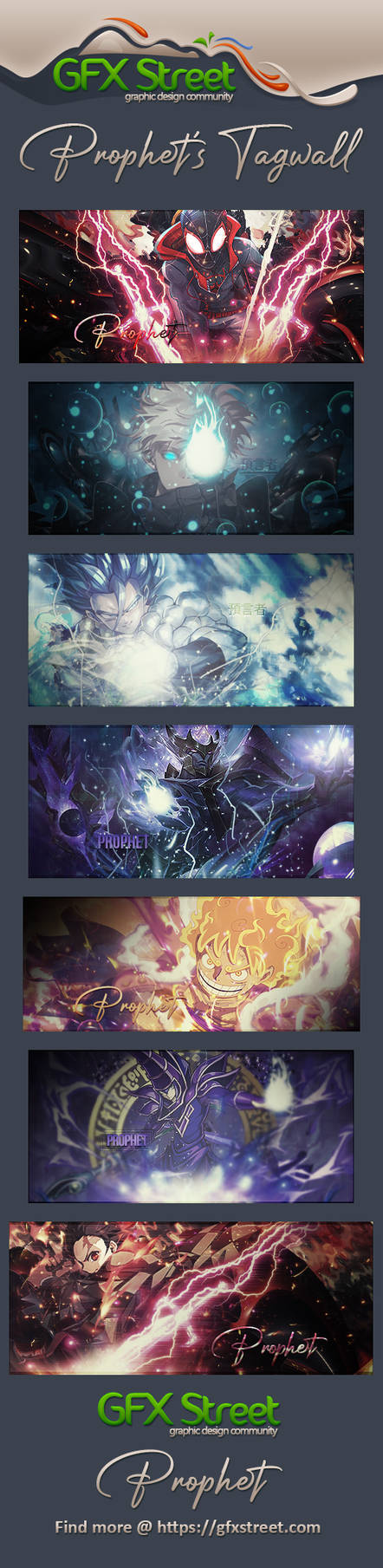
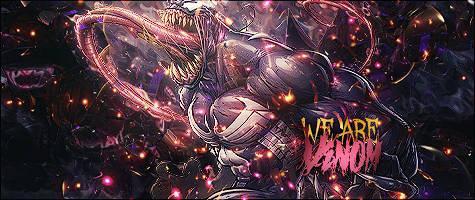
Some more recent-ish(?) signatures that I made whenever GFX Street was a thing, I think this was around 2023.
prophet
·Pixel Competitions
·6 days ago
November 1st at 10:30 AM CST to December 1st at 2:00 PM CST
Pixel Point is officially open, so let’s fill it up! For our first month, the member who makes the most posts wins 1,000 Credits to spend around the board.
How It Works
There’s nothing to sign up for. Register, start posting, and you’re in. Topics and replies both count.
Rules
Only posts made between November 1st at 10:30 AM CST and December 1st at 2:00 PM CST count.
Forum Games posts don’t count.
Posts need to be real. Spam, one-word posts, and posts made just to raise your count won’t count.
Deleted posts don’t count.
It’s one person, one account. No alt accounts.
Staff can’t win, but we’ll be posting right alongside you!
Picking the Winner
Once the competition ends, we’ll check the top posters by hand and announce the winner here on December 3rd. If there’s a tie, we’ll hold a random draw between the tied members and share the result.
If something looks off, we can remove posts from your count or remove you from the competition. Staff have the final say.
Have fun and good luck!
Gizmo
·Entertainment Realm
·6 days ago
I've recently watched and loved Weapons, The Substance and Send Help. All three were great in their own ways! I also watched Buddy, but that one was a little too weird for me. 🤣
What recent horror movies have you enjoyed? I'm always looking for something new to add to my watchlist. What would you recommend?
 Daedalus
·Entertainment Realm
·6 days ago
Daedalus
·Entertainment Realm
·6 days ago
A place to discuss what novels you're planning to read, what authors you're interested or keeping up with, stuff like that.
Daedalus
·Entertainment Realm
·6 days ago
Your 2026 Reading List
Here's a place to catalog what you've read this year. For those who made resolutions to read more (like I did) or just want to see how much you read in a year, this will be a lot of fun for you.
Be sure to post a list of what you read last year in your first post so that we can see what we accomplished in 2026.
Daedalus
·Social Lounge
·1 week ago
Take a moment and vent here, no one will judge you.
Daedalus
·Social Lounge
·1 week ago
Have you heard about this? Why is it all over social media? Well, that I can't answer. I can tell you it's a word game that is the current obsession for no apparent reason and I'm definitely addicted like everyone else.
How do you play?
First, go to this link: https://www.nytimes.com/games/wordle/index.html
Rules:
You have 6 tries to guess the WORDLE.
Each guess must be a valid 5 letter word. Hit the enter button to submit.
After each guess, the color of the tiles will change to show how close your guess was to the word.
Yellow = correct letter, wrong position
Green = correct letter, right position
__
Wordle 1,960 4/6
⬛⬛🟨⬛⬛
⬛🟨⬛⬛🟨
🟨🟨⬛⬛🟨
🟩🟩🟩🟩🟩
prophet
·Theme Gallery
·1 week ago
Name: Dusk & Dawn
Author: @prophet
Preview: Click Here
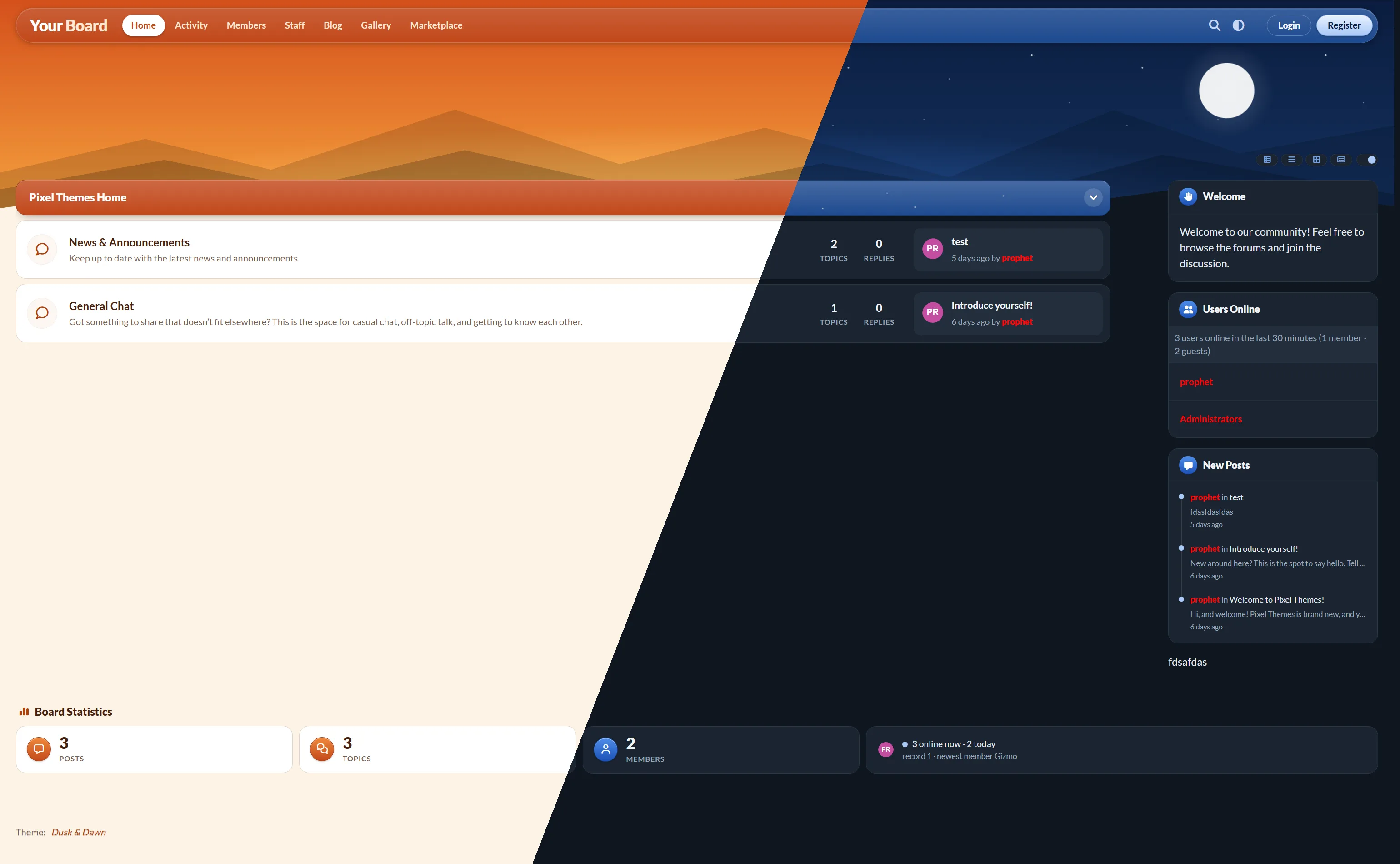 Notes: Dusk & Dawn is a day and night forum theme that changes with the mode. Light mode is a glowing orange sunset with a sun over layered mountains, and dark mode is a starry night sky with a moon. A floating header, rounded forum rows and gold or moonlight buttons tie the two together. Includes an editable text logo and adjustable banner.
File Link: dusk-and-dawn.zip
prophet
·Design Discussion
·1 week ago
Every designer has a few fonts they always seem to reach for. Maybe it’s the one that saves a project when nothing else looks right, or the one you’ve used so often you could spot it from across the room.
Share your favorites:
Which fonts do you use the most? It can be one or a list of fonts.
Why do they work? Is it the readability, the personality, or something else?
What do you use them for? Logos, headings, themes, signatures, posters?
Any font pairings you swear by?
prophet
·Support
·1 week ago
Support Guidelines
Stuck on something? Our Support forum is open to anyone who needs help with a theme, widget, code, or graphic, even if we didn’t make it.
We Can Help With
Installing or setting up any theme, code, or widget
Fixing something that isn’t displaying or working correctly
Understanding HTML, CSS, or JavaScript on your board
Graphic design questions, including software, tools, techniques, and file formats
Feedback on what’s going wrong with a design
We Can’t Help With
ForumSpark issues, such as outages or billing. Please contact ForumSpark support.
Custom work done for you. Please use the Requests forum.
Removing credits or sharing paid work.
How to Ask for Help
Start a new topic with a clear title and include:
What you’re working on:
Your board link, if it’s for your board:
What’s going wrong:
What you’ve already tried:
Screenshots or code:
Quick Rules
Use one topic per problem, and search first in case it’s already been solved.
Be patient and kind. Everyone here is helping in their own time.
Never post your password or admin login. We will never ask for them.
Once it’s fixed, reply to let us know what worked.
prophet
·Requests
·1 week ago
Need a theme, custom code, or small art for your board? Post a request here using the form below. A team member will reply to claim it, confirm the price, and give you an estimated timeline.
Check the Theme Gallery and Codes & Widgets first. What you need may already be available.
Use one topic per request, and fill out the full form.
Have your images, colors, and text ready. We can't start without them.
Don't start a new topic to chase a request. Reply in your existing topic instead.
Staff can decline any request, including anything offensive, stolen, or against the ForumSpark rules.
Copy this into a new topic and fill it out. Delete any section you don't need.
Request type: Theme / Code or Widget / Signature / Banner / Affiliate Button
Your board link:
Description: What do you want, and what should it do?
Colors and style:
Size: For art only. Leave blank for standard sizes.
Text to include:
Images or assets: Links to anything we should use.
Examples you like:
Deadline: Leave blank if you don't have one.
All prices are in Credits. These are starting prices, and your final price is confirmed before work begins.
Small Art
Affiliate button: 200 Credits
Signature: 250 Credits
Banner: 300 Credits
Custom Codes & Widgets
Small tweak (a color, spacing, or layout change): 150 Credits
Custom code or simple widget: 400 Credits
Advanced widget or feature: 800+ Credits
Themes
Recolor or edit of one of our themes: 500 Credits
Custom theme built from one of our themes: 1,500 Credits
Full custom theme: 3,000+ Credits
Extras
Extra revision round: +25% of the original price
Major change after work has started: quoted separately
Post your request using the form.
A team member claims it and confirms the price and timeline.
A staff member will deduct your Credits. Small art and tweaks are deducted on delivery. Custom widgets and themes are deducted 50% up front and 50% on delivery.
We share a preview for your feedback.
Once approved, any remaining Credits are deducted and you receive the final files.
Small art: 1 to 3 days
Tweaks and simple codes: 2 to 4 days
Advanced widgets: 1 to 2 weeks
Themes: 2 to 4 weeks
These are estimates and depend on how many requests are open.
Small art and tweaks include 1 round of revisions. Custom widgets and themes include 2 rounds. Reasonable bug fixes are always free.
You can cancel any time before work begins. After that, up-front payments are not refunded. If we can't finish your request, you'll get your up-front payment back.
Finished work is for the board or member it was made for. Please don't resell, reupload, or claim it as your own. Keep any credit included in the work. Unless we agree otherwise, we may show finished work in our galleries.
prophet
·Community Feedback
·1 week ago
Having one of our signatures or affiliate buttons is one the best ways to advertise us.
Signatures

[url=https://pixel-point.net/][img]https://i.ibb.co/GvX015WD/pixelpoint-300x150-no-rounding-1.png[/img][/url]
[url=https://pixel-point.net/][img]https://i.ibb.co/TxXfcgqG/darksig.png[/img][/url]Advertising Banners:


Affiliate Buttons

[url=https://pixel-point.net/][img]https://files.forumspark.net/boards/55992fd1-4197-4089-bde9-26f18f40e6b9/oZo6wX6s1YHWeWeiC2uCQYjhuC18BDSkjPdr9QmZ.gif[/img][/url]<a href="https://pixel-point.net/"><img src="https://files.forumspark.net/boards/55992fd1-4197-4089-bde9-26f18f40e6b9/oZo6wX6s1YHWeWeiC2uCQYjhuC18BDSkjPdr9QmZ.gif"></a>I've attach PSD's for both files, you may edit as you like, but please don't claim that you made them.
The name can easily be edited, as well as the colors by changing the gradient overlay on the base image.
If you do not have Photoshop, feel free to PM me with the color scheme and the name of your forum, as well as a slogan.
Download Link: Click Here
Preview:


prophet
·Theme Gallery
·1 week ago
Name: Ledger
Author: @prophet
Preview: Click Here
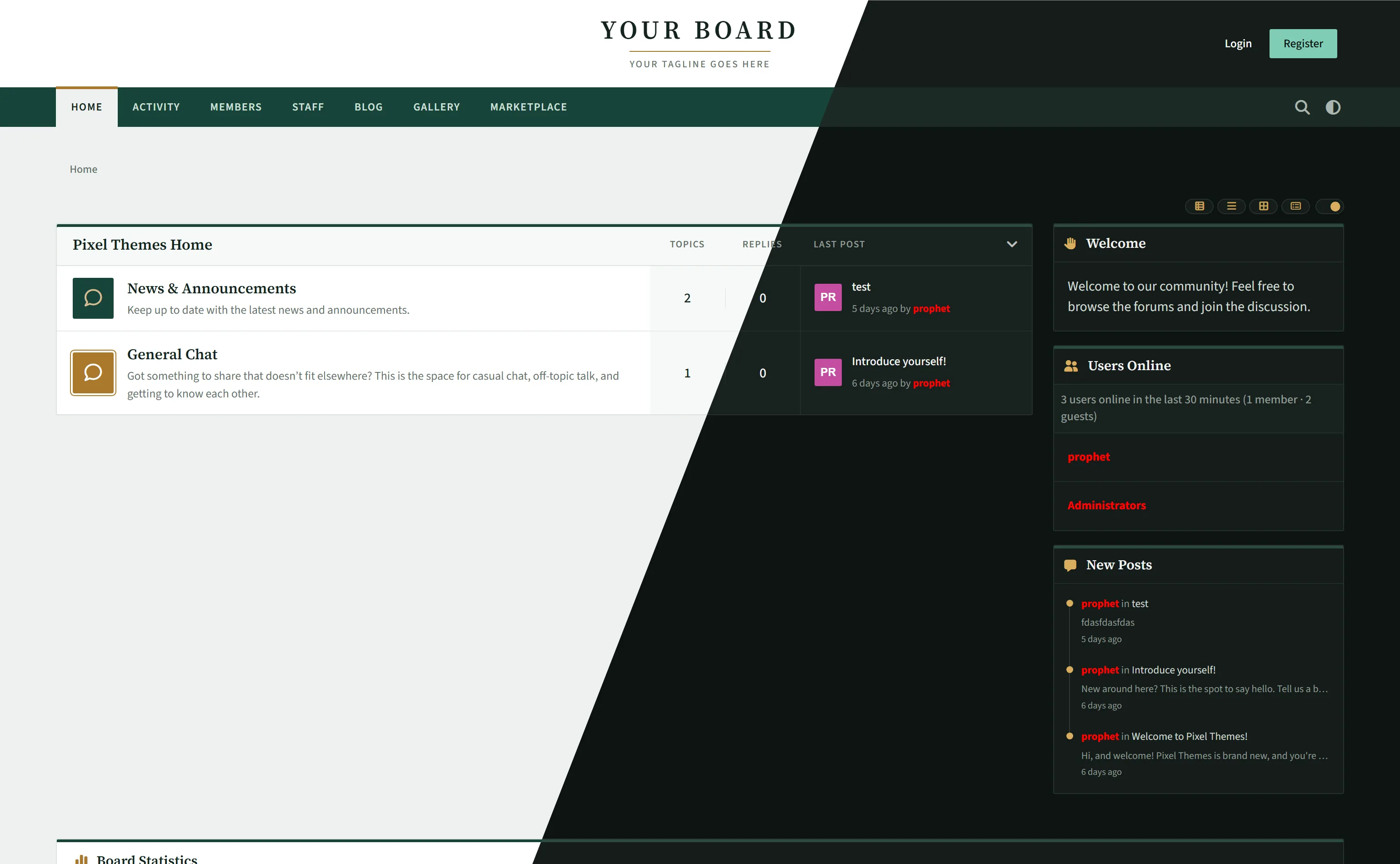
Notes: Ledger is a refined, traditional forum theme in deep pine and brass. A centred serif masthead, folder-tab navigation and clean forum tables with Topics, Replies and Last post columns give your board a timeless, professional feel. Includes light and dark modes, an editable text logo and full Theme Studio colour control.
File Link: ledger-theme.zip
prophet
·Theme Gallery
·1 week ago
Name: Skyglass
Author: @prophet
Preview: Click Here
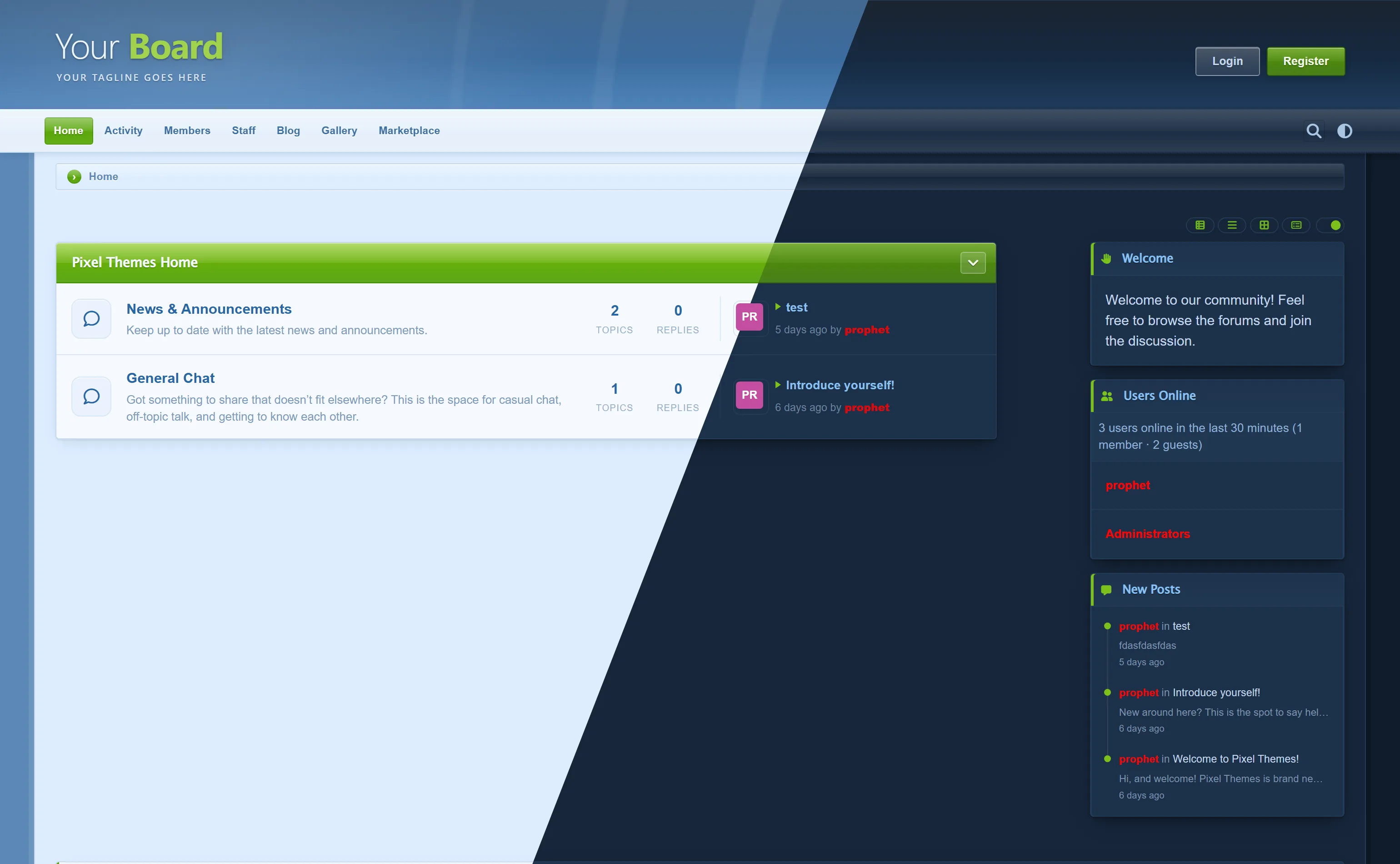
Notes: Skyglass is a theme that was heavily inspired by the Zetaboards Theme Zone/Zathyus Networks official support forum’s theme back in 2012. There is a README within the ZIP that explains how to change the banner text.
File Link: Skyglass.zip
prophet
·Theme Gallery
·1 week ago
Name: Folio
Author: @prophet
Preview: Click Here
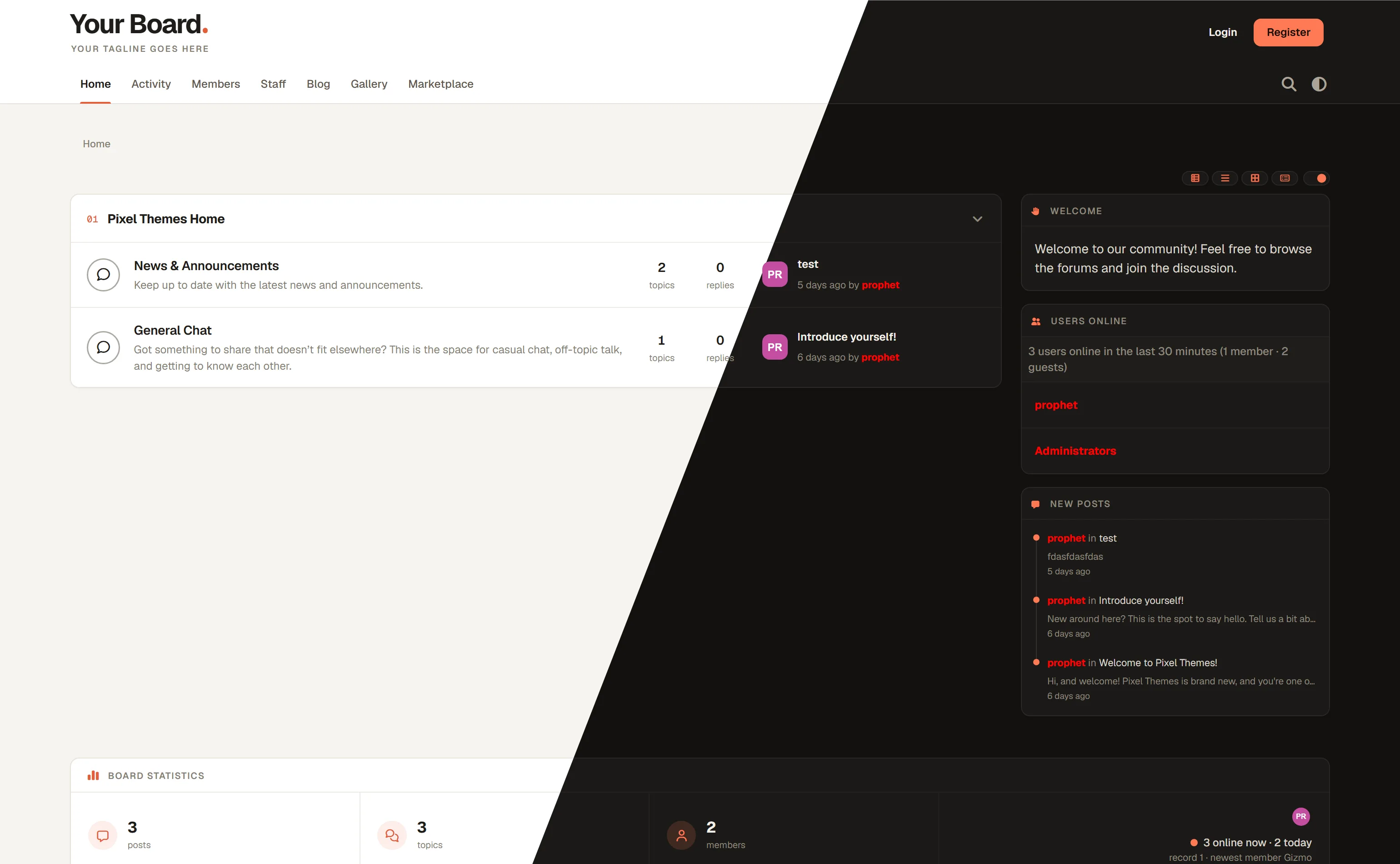
Notes: Folio was created to be a simple, but sleek theme for people who are looking to create something blog related, or simple.
File Link: folio-theme.zip
Gizmo
·Ask Me Anything
·1 week ago
Ask me questions. Also feel free to feed me after midnight 😄