I'm currently using the light theme, I have the 'Global Dark Mode' option disabled in my User CP. However, when I update something like my location or title and hit the 'Save' button, my theme automatically changes to the dark mode
So I enabled the Link Directory extension and a menu bar item was automatically created for the Link Directory in the navigation. When I go into the menu bar settings to edit the label, for example from Link Directory to Showcase, and/or add an icon for the navigation, there is no feature option to direct to the Link Directory (see screenshot). It defaults to the Board Home.
I could easily add the /link-directory url as an external link, however that opens the link in a new tab which I don't want.

Was trying to add code for an extension on board templates and it has boxes but they have no where to put text/code. Hovering the cursor over the box doesn't change the cursor. Clicking on the box does nothing and the title such as, "Below the Board" is clickable but that does nothing.
This is on my PC using both Chrome based and FireFox based browsers. I was, however able to click and paste on my mobile FireFox browser.
I didn't see this reported anywhere, but apologies if it was and I missed it.
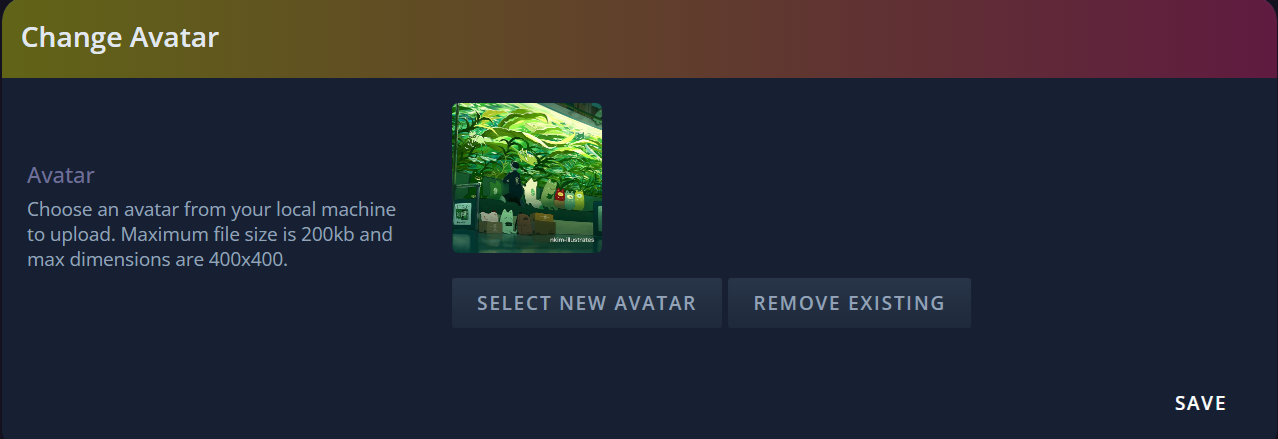
In the ACP, I changed the dimensions of the allowable avatar size from 400x400 at 200kb to 300x500 at 900kb. I've also tried 500x500 and 200x200 to see if it always had to be square, but nothing was reflected in edit profile > edit avatar.
However, it saves in the ACP. I can save my custom dimensions in the ACP, come back to it days later, and my custom choice is still in the ACP. It just doesn't seem to affect edit profile > edit avatar.
ACP where it reflects my choice:

Edit Profile > Edit Avatar:

I've tried this on all three of my Spark forums I'm setting up, and all three do this.
Within the link directory when you create custom fields for each category (great idea btw) there's an option for a checkbox (Yes/No) However, selecting this option only gives you the option to check "Yes", there is no "No" option.
I don't know if it's due to having it set as a "Required" field or not, but there should be a "No" option next to "Yes" and the "No" option should be selected by default IMO.
See here:

Hope to see this resolved soon. :) Thanks!
I'm trying to make subforums, but I just noticed they're not saving.
I'm trying to make:
[Category]
-Forum 1
Subforum, Subforum, Subforum
-Forum 2
Subforum, Subforum
etc.
I checked settings to see if there was something I needed to toggle to allow subforums, but I didn't see anything. Am I missing something?
'Sup everyone, first of all, tysm for everything this platform has to offer. I just started my forum, and for some reason, I can’t create new sections. I deleted the default sections that come with the site, but even before that, it wouldn’t let me create anything new. I’ve checked every single option there is, and it still isn’t working. I don’t know if I’m doing something wrong or if it’s genuinely a bug.
I was responding to a conversation and while still typing out my response, the entire response disappeared. This happened to me twice.
I tried adding some custom emoticons to my community and had them show up in the list. When I click on one of the custom emoticons, it only shows the text that it is supposed to replace and not the actual custom image I selected.
However, in the emoticon section of the ACP, it seems to be displaying the new emoticon image correctly.
When using the users online widget, if you click on a user's avatar, it should go to the user's profile, but instead it simply refreshes the page/index.
This feels like a bug and should be addressed.
Even if you don't have the color option checked for categories & forums it still utilizes the color choice.
Also, since this has been implemented all themes basically break (probably due to this bug) using a black background for categories & the like.
Just thought i'd bring this to your attention as a potential bug. :)
Good morning!
This is a tiny detail, but it annoys me all the same. When viewing my messages on the Conversation page, there are no extra line breaks between Sparko's paragraphs. But, the same conversation in the messages bar at the bottom of the screen has the extra line breaks, improving readability.
Please make them match, next time you're digging around in there!
EDIT: Firefox 150.0 on Windows 11 10.0.26200

Enable the credit system and shop ;)
Via the Board Menu, added another menu, well it's already there anyway.. but edited it and now I can't see the shop under type. I got to add it via external URL.
Most of the edits I'm making to my site's CSS are only showing up for other accounts. When I view the site from my main, all that's changed are the fonts and the new custom membergroup colours. It also seems that changes to HTML are saving fine, since I edited my main profile code a lot and that's all showing up. I've checked in the ACP that there's only one theme, and I currently don't have the light/dark toggle enabled on my site. The pop-out theme editor, and the ACP stylesheet, both show the edits that I've made, they're just not conveying to the site for some reason.
I think I found a potential bug with the theme editor. When using the colour selectors it'll change the colours for the account that I am using but doesn't apply them to other accounts. It seems like it doesn't actually change the CSS and that may be why this is happening.
I was changing around a few things in the Admin Panel (https://test_forum.forumspark.net/admin/themes/1/style) and saved the changes. None of them appeared onsite. I opened the theme editor and none of the CSS there was changed to match what I'd done in the AP. I coped the Admin Panel stylesheet to the theme editor, clicked save, and all my changes appeared immediately.
Hi there! I was trying to upload into the file manager but it seems to get stuck on Uploading and not do anything. Its been sitting here for about 5 minutes now. Very small image file (& not actually a photo of a booger.. i feel like i need this disclaimer lol)

A few weeks ago I was able to use the file manager and I remember it was uploaded very quickly. Tried logging out & back in but that doesn't seem to help. Potentially a bug with one of the newer updates?
Not sure if this is a bug or if it's intentional, but only one of my forums shows up in my Forum Spark Hub account. I made a forum last year to test things out, but I was hoping my new forum Alt Forums would show up as well on my account. It has SSO enabled and is part of the directory as well.
Hi Team,
Noticed this while I just created a new forum.
Admin CP > Member Search
The member actions dropdown menu gets cut-off or hides inside the containing table/box.
Check the screenshot for clarity:

Nothing critical but better if fixed.
Thanks!
✨
Stylesheet is glitching. Been doing this for approximately 12 hours now, that I know of?
Screen recording: https://www.dropbox.com/scl/fi/nu0mak059rngosz5gittj/glitching-stylesheet.mp4?rlkey=tme80mrkie3k2z70jsfm0pcfo&st=evqkhpn6&dl=0
Issue: I can't type in the stylesheet without the text bouncing around and creating what I initially typed from anything else I try to type, including just hitting the enter key. Delete and backspace kind of work.
Not recorded, but I've also tried copy/pasting code I'll write externally, but it'll paste it twice on the same like, so...
.korokexample{color:#fff;} will look like .korokexample{color:#fff;}.korokexample{color:#fff;} and I can't delete one of them. It'll delete more than I want it to delete, like removing the } of the first .korokexample. Adding the } doesn't work, as it'll just add all sorts of text as you see in the vide with .ko.
If you need a more thorough video, I can record a longer one.
Edit: I forgot to mention, but Board Templates is fine and works as expected. It's just the theme stylesheet that's wigging.
I was checking out one of my test threads and noticed that my primary account's avatar had been copied onto its alias. I uploaded a different avatar to the alias account, and that avatar was copied onto my primary account.
I went to check the emoticons and accidentally hit "Add Reply" without typing anything in one of the threads over here and it went through as a blank post. See here - What's your Favorite hobbies outside gaming? - ForumSpark Support
This obviously shouldn't be allowed & should be addressed. :)
So i just checked a thread of mine here - https://revillution.forumspark.net/topics/affiliate-with-revillution.50066
and it's broken, the BBcode doesn't parse and when i clicked "Edit" the emotes on the left side aren't there at all.
Edit: Here's another example, a youtube video should be shown instead it's just a link: Road to 200 for CarlosX720 - Revillution
If i try to hide the original category and 3 forums that get created with FS, it removes all my other forums. This seems like a bug?
If i try to hide the original category that's autocreated when you make a forum, this is what happens:

I was testing out the bulletins and when i went to delete the one I made I got the following error instead of it just deleting and going back to the bulletin's page:

Take note of the URL for more assistance in fixing the bug I suppose.