ForumSpark Support

support.forumspark.net

Official support and community forum for ForumSpark. Access announcements, troubleshooting, customization help, extension development, theme resources, and platform updates.

205 members 716 topics 3K replies
Cedric ·ForumSpark Headlines ·7 months ago
Customizing ForumSpark: Themes, Extensions & What's Coming

Customizing ForumSpark: Themes, Extensions & What's Coming

Customizing ForumSpark: Themes, Extensions & What's Coming

One of the things I get asked about most is how far you can take ForumSpark when it comes to making it your own. So I wanted to put together a proper rundown of what's possible today, where the limits are, and what we're working toward.ThemesThe theme system is probably the most powerful tool you ha...

Read the full article →

6 replies 676 Read more →
Korok ·Support ·7 months ago
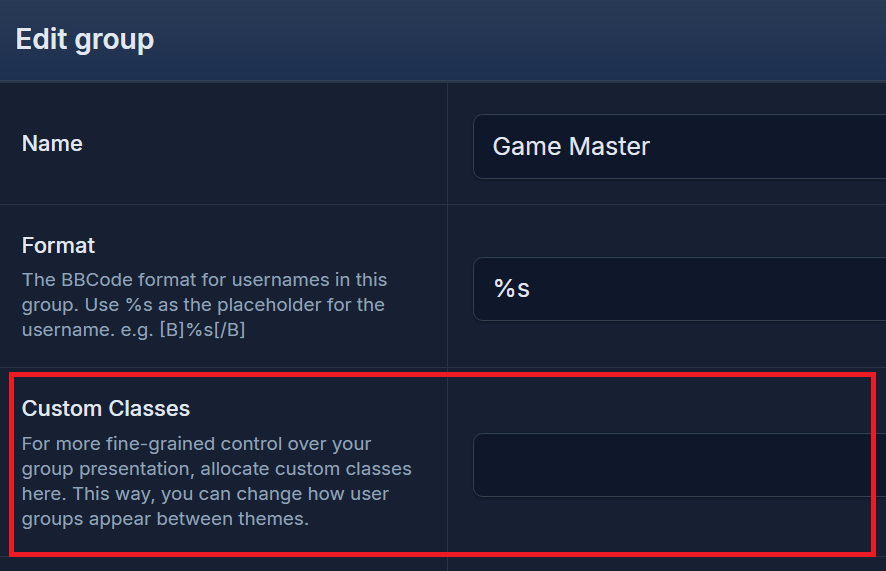
Not sure how to fill out Custom Classes

Sorry, I don't know why that image is so huge.

I don't know how to fill out the "custom classes" field. I've tried "korok" "<span class="korok">" and "<span class="korok">%s</span>." I checked the documentation/guide, but it doesn't specify how we're supposed to field out either.

Thanks in advance!

12 replies 521 Read more →
Ravenfreak ·Bug Report ·7 months ago
Only one of my forums shows up on my ForumSpark Hub account

Not sure if this is a bug or if it's intentional, but only one of my forums shows up in my Forum Spark Hub account. I made a forum last year to test things out, but I was hoping my new forum Alt Forums would show up as well on my account. It has SSO enabled and is part of the directory as well.

7 replies 544 Read more →
? Deleted user ·Support ·6 months ago
Question about version 1.3.7

Hi,

I was wondering if the option to remove your forum has been added yet in the latest version, I created a forum but selected the wrong subdomain, and wanted to delete it and create the correct one.

3 replies 488 Read more →
S sparkles ·Bug Report ·6 months ago
Actions menu getting cut-off

Hi Team,

Noticed this while I just created a new forum.

Admin CP > Member Search
The member actions dropdown menu gets cut-off or hides inside the containing table/box.

Check the screenshot for clarity:

Nothing critical but better if fixed.

Thanks!

✨

3 replies 474 Read more →
S sparkles ·Support ·6 months ago
Forum Access - View vs Read

Hi team,

Got a super simple question.
When it comes to Forum Access settings, what's the difference between View and Read?

Thanks!

✨

4 replies 510 Read more →
Smokey ·Feedback ·6 months ago
Allow for a "Home" link to direct to a website or page of our choosing and a "Forums" tab to the board index?

So basically, similar to Xenforo, let the "Home" tab have the option to direct back to a homepage or landing page of our choosing while the "Forums" tab have it directed to the board index.

In the case of ForumSpark here, the "Home" tab should direct back to forumspark.net while a "Forums" tab can direct back to the index of the support forums.

1 reply 474 Read more →
Korok ·Bug Report ·7 months ago
Stylesheet is glitching

Stylesheet is glitching. Been doing this for approximately 12 hours now, that I know of?

Screen recording: https://www.dropbox.com/scl/fi/nu0mak059rngosz5gittj/glitching-stylesheet.mp4?rlkey=tme80mrkie3k2z70jsfm0pcfo&st=evqkhpn6&dl=0

Issue: I can't type in the stylesheet without the text bouncing around and creating what I initially typed from anything else I try to type, including just hitting the enter key. Delete and backspace kind of work.

Not recorded, but I've also tried copy/pasting code I'll write externally, but it'll paste it twice on the same like, so...

.korokexample{color:#fff;} will look like .korokexample{color:#fff;}.korokexample{color:#fff;} and I can't delete one of them. It'll delete more than I want it to delete, like removing the } of the first .korokexample. Adding the } doesn't work, as it'll just add all sorts of text as you see in the vide with .ko.

If you need a more thorough video, I can record a longer one.

Edit: I forgot to mention, but Board Templates is fine and works as expected. It's just the theme stylesheet that's wigging.

5 replies 525 Read more →
Smokey ·Feedback ·7 months ago
New topics widget - label "Last Reply" for last reply.

RIght now the new topics widget could be a little confusing as it doesn't show which one is the last reply, see here:

It's the bottom one after the body of text for the 1st post of a topic. I think if you're going to show who replied last within this widget a "Last Reply:" indicator would make things a bit clearer & easier to understand.

Cedric ·ForumSpark Headlines ·7 months ago
Release 1.4.0

Release 1.4.0

Release 1.4.0

I'm pleased to announce our newest version: 1.4.0. I've bumped this version up a bit because there are some pretty major changes under the hood.We’ve moved from Laravel 10 to 12 and Livewire 2 to 3.7. These updates give us a much more stable and future-proof base to build on, while we wait for newer...

Read the full article →

8 replies 589 Read more →
Korok ·Support ·7 months ago
Avatar dimensions and size settings not registering

I'm not sure if this is a bug, or if this is a user-error on my part so I figured I'd post here first just in case it's user-error.

  • I changed the dimensions + the file size for avatars in the acp

  • Went to upload an image with those dimensions, and it didn't work. Noticed that the dimensions in edit profile > edit avatar are still showing default

  • Changed dimensions and file size a few times. Tried 400x400 at 500kb, 400x400 at 1000kb, 300x500 at 500kb, 300x500 at 1500kb, 300x300 at 200kb (at this point, I was just seeing if anything would stick). Nothing I tried worked.

Yes, I did save my intended dimensions and file size. I've exited my browser and logged back into my site to see if that would do anything. It didn't. I'm not sure what else I would do to troubleshoot this.

Thanks in advance!

https://ushinokoku.forumspark.net

Jamie ·Themes & Extensions ·8 months ago
Nord

Name: Nord

Author: Jamie

Version: 1.0.0

A quick theme based on the Nord colour palette.

See it here: Preview Theme

To install, use the Import Theme feature from your theme manager in the Admin CP and import the JSON below.

Download

If you spot any issues let me know.

5 replies 145 Read more →
Korok ·Support ·7 months ago
[Solved] Sticky tabs work on Codepen, but not on Spark Pages

Hi again!

I'm not sure if this is something I can ask for support on, but worth a shot? I suspect something in this code is interfering with Spark, but I'm not sure how to fix it. If this isn't the type of thing I can ask for support here, I'll check the resource forum to see if there's a code support area there. c:

With the help of Cory and another (they made the skeleton for me), I made a tabbed table to act as an info page on Spark's pages. I made the horizontal and vertical tabs sticky - which do work in codepen.io. I changed the .buttons code to .buttons2 just case it was used somewhere on Spark (had that issue before), but they're still not sticking. Would it be possible for someone to take a look and see what might be interfering?

Thanks in advance!

The longest tab at the moment is "Factions," so you can see the lack of sticky tabs there:

https://ushinokoku.forumspark.net/pages/guidebook

And here's the codepen (I just shrink the window to preview the sticky):

https://codepen.io/iotacat/pen/jEMZLBN

3 replies 471 Read more →
Korok ·Support ·7 months ago
Where to edit colours of XYZ

Hello!

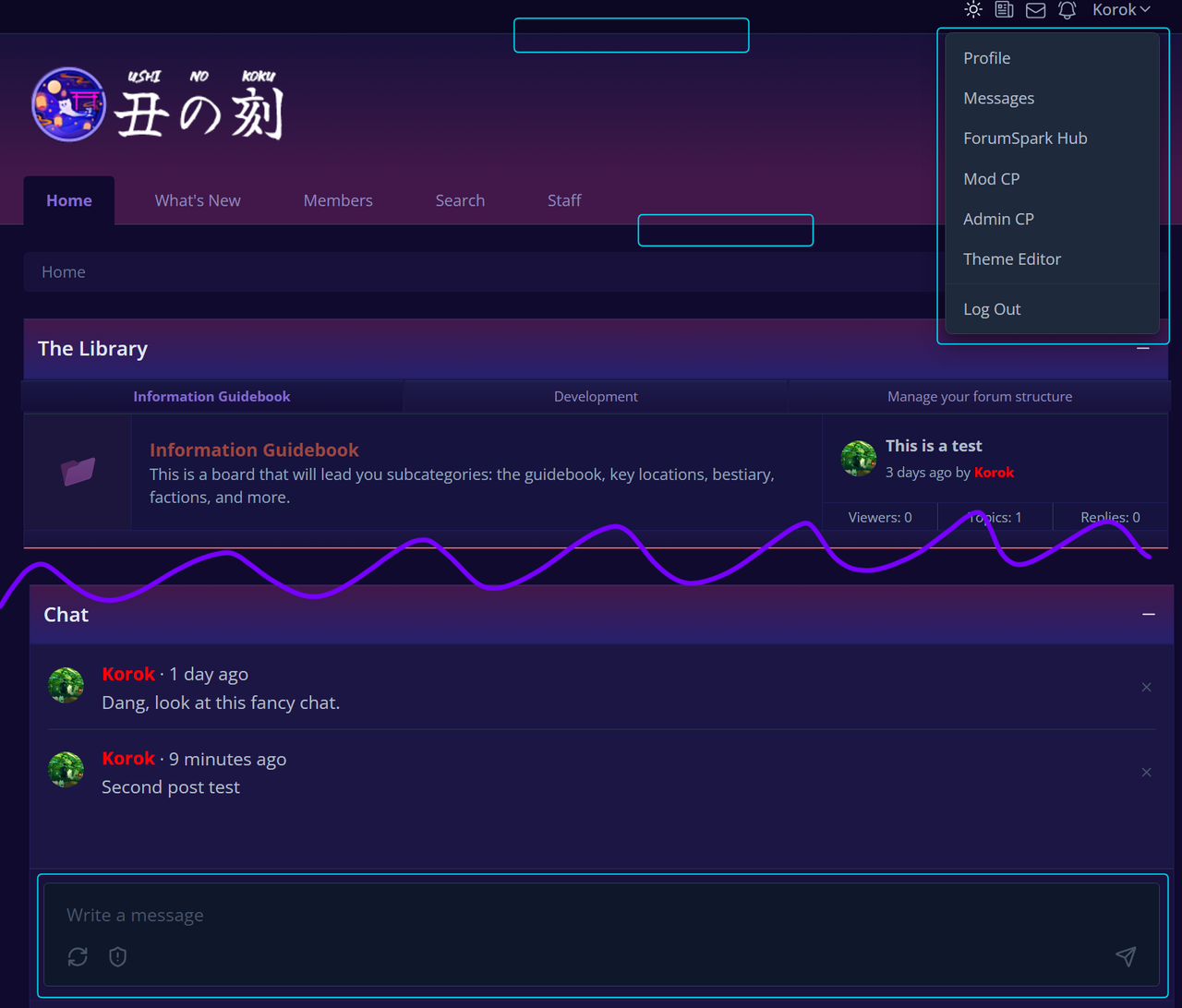
Sorry for posting again so soon. I can't seem to find where to edit the colours of the dropdown menu, some borders, and the text field of the shoutbox in the theme editor. I outlined them in blue for reference.

3 replies 334 Read more →
Striker ·Introductions ·7 months ago
Heya 👋

Hey all, poking around since I saw a lot of discussion happening lately on RPG-D. I'm pretty intrigued by what I've seen so far and looking forward to seeing where development goes. Depending on how it looks in the future, I might start figuring out how to port some of my profile codes. Can't hurt to learn something new, right?

3 replies 590 Read more →
Jamie ·Themes & Extensions ·1 year ago
Flux

Name: Flux
Author: ForumSpark
Version: 1.0.0

Live Preview (No Sidebar) / Live Preview (Sidebar)

Get the theme files from: https://github.com/forumspark/flux-theme/releases/tag/1.0.0

Installation instructions:

  1. Create a new theme in your admin area
  2. Untoggle the option to inherit from the default editor
  3. Edit the stylesheet and copy the stylesheet over (theme.css)
  4. Copy the guest.html into the Guest Layout section of the theme -> Admin CP / Themes / Edit Layout
  5. Depending on the version you want to use copy either layout.html or layout_sidebar.html over to the Layout for the theme

Theme images can be found here: https://github.com/forumspark/flux-theme/tree/master/assets

To change the header image you will need to edit the theme layout and replace the SVGs

<svg class="h-8 text-zinc-950 block dark:hidden" fill="none" xmlns="http://www.w3.org/2000/svg" viewBox="0 0 194 91">...</svg>
<svg class="h-8 text-white hidden dark:block" fill="none" xmlns="http://www.w3.org/2000/svg" viewBox="0 0 194 91">....</svg>

I suggest you upload your light / dark header images to your file manager then replace the above with

<img src="LIGHT_LOGO_URL" class="h-8 block dark:hidden" />
<img src="DARK_LOGO_URL" class="h-8 dark:block hidden" />

As usual if you spot any bugs / issues with the theme, let me know here and I'll get it updated.

3 replies 227 Read more →
Cedric ·ForumSpark Headlines ·7 months ago
Release 1.3.7

Greetings everyone!

Happy to announce we've just upgraded the server with double the resources as before. Along with a new fresh breath of air, I've also released 1.3.7 which in short gives the following:

  • Widget system: full sidebar/content widget framework with 13 built-in widgets, drag-and-drop management, per-user dismissal, context-aware placement, widget creation, etc.

  • Theme editor: panel corner radius setting, dropdown menu colors in color palette

  • Avatar settings: configurable max width, height, and file size per board in ACP

  • Add Mark All Read button on conversations index

  • Show modal to move all members to selected group before deletion

Along with a few minor improvements.

Our Widget Manager can now be found in the ACP and the user menu dropdown under Theme Editor.

What's the Widget Manager you may ask?

The Widget System lets board admins customize their forum's layout by placing configurable content blocks (widgets) into different areas of the page - no coding required.

Widget Areas

Widgets can be placed in 5 page zones:

  • Header Banner: Right area at the very top of the page

  • Above Board: Between the header and the forum listing

  • Sidebar: Right column alongside the main content

  • Below Board: Under the forum listing

  • Footer: Bottom of the page

Widgets can be dragged and dropped between areas to rearrange them instantly.

Built-in Widgets (13 total)

Widget

What It Does

Announcement

Displays a styled banner with a message and optional call-to-action button. Choose from 4 styles: Info (blue), Warning (amber), Success (green), or Primary (indigo). Works in both light and dark mode.

Board Statistics

Shows your forum's numbers at a glance - total posts, topics, members, newest member, and record online users. Two display styles: Cards (icon grid) or Inline (compact bar).

New Topics

Displays the latest topics as rich cards with author avatars, content previews, last reply info, and view/reply counts.

Recent Activity

Shows the most recently active discussions - topics that just received new replies.

Images Carousel

Display a rotating slideshow of images with smooth fade transitions, dot navigation, and optional per-image links. Also supports a static grid layout.

Online Users

Lists currently online members. Two modes: Usernames (classic list) or Avatars (stacked profile pictures with online indicator rings).

Top Posters

Ranks your most active members by post count with their avatars and badges.

Upcoming Birthdays

Shows members with birthdays today, complete with a cake icon. Respects members' privacy settings.

Tell a Friend

Share buttons for your forum - Copy Link, post to X (Twitter), share on Facebook, or send via Email. One-click sharing.

Welcome

A simple welcome message for visitors - great for first impressions.

Shoutbox

Real-time chat box for quick conversations (powered by Livewire).

Raw HTML

Insert custom HTML code directly - for advanced users who want full control.

WYSIWYG

A rich text content block - write formatted content without touching HTML.

Per-Widget Settings

Every widget supports:

  • Visibility Rules: Show to everyone, guests only, members only, or specific user groups

  • Device Targeting: Show on desktop only, mobile only, or both

  • Dismissable: Let users hide widgets they don't want to see (restorable from profile settings)

  • Custom CSS: Add your own styling tweaks per widget

  • Custom Padding: Fine-tune spacing (top/right/bottom/left)

  • Wrap in Panel: Choose whether the widget gets a titled card wrapper or renders standalone, great if you want to style it yourself

Custom Theme Compatible

Widgets work on all themes, including fully custom themes that don't inherit the default stylesheet. Every widget includes fallback styling so it renders correctly regardless of theme configuration.

Our docs will soon be updated with the new widget manager. As always, feel free to leave some feedback and help shape ForumSpark's next version! 😊


24 replies 1K Read more →
era ·Support ·7 months ago
Alias' Mini Profile

Hello! Apologies if this is not the right section to be posting this. I've been playing around with Forum Spark to create a new RPG site. I was testing out the Alias' feature & it seems when posting the mini profile is still that of the parent account, however on clicking the Alias it does go to the Alias' profile.

Just a little suggestion, not sure if its possible but I think what the RPG community is looking for with Alias' is for it to function a lot like a separate account. So editing the Alias' member group separate from the parent account, seeing its own mini profile & the alias show up on the member list/online list would be greatly helpful.

Thank you so much for your efforts with this forum! I'm looking forward to seeing how Forum Spark develops :)

3 replies 597 Read more →
Cedric ·Themes & Extensions ·7 months ago
Theme Directory Guidelines

First of all, thank you for taking the time to design and share themes for ForumSpark. A fresh, well-crafted theme can completely transform the look and feel of a board, and your contributions help make that possible for the entire community.

While we welcome all creative styles, we do ask that submissions meet a certain standard to ensure consistency and usability across the platform.

Before sharing your theme, please keep the following in mind:

  • Fully functional & tested - No broken layouts or major UI issues

  • No “default” leftovers - Avoid obvious missing styling or unfinished areas

  • Clean and user-friendly design - Prioritize readability and usability

  • Avoid bad practices - Excessive hardcoding and !important usage should be kept to a minimum

  • Provide previews - Include clear screenshots or, ideally, a live demo board

  • Include key details - Compatibility, features, and any special requirements

High-quality themes benefit everyone and help build a stronger, more polished ecosystem.

Thank you,

-ForumSpark Team

Cedric ·Themes & Extensions ·7 months ago
Extensions Directory Guidelines

First of all, thank you for considering building and contributing to ForumSpark. It’s always great to see new ideas and functionality being shared with the community.

While we strongly encourage contributions of all kinds, maintaining a certain level of quality is important for everyone using ForumSpark. Well-built extensions not only improve individual boards, but also help strengthen the ecosystem as a whole.

Before publishing your extension, please take a moment to carefully review our documentation: https://docs.forumspark.net/api/

To keep things smooth and useful for everyone, here are a few simple rules:

  • Follow the API/JS standards - Extensions should align with our documented structure and practices.

  • Keep it stable - Avoid releasing unfinished or highly experimental builds.

  • No duplicate functionality - Check existing extensions before posting something similar.

  • Provide clear details and previews - Include a proper description, features, and usage instructions including a preview through a test board.

  • Respect performance - Extensions should not negatively impact board speed or stability.

  • Keep it maintained - If you publish it, be prepared to support and update it.

This will help ensure your work follows best practices, remains compatible, and delivers a smooth experience for board owners.

Thank you,

-ForumSpark Team

Cory ·Feedback ·1 year ago
What extensions would you like to see?

As someone who knows HTML, CSS, and JavaScript I'm interested in developing some extensions for ForumSpark. The question is, what types of extensions would you like to see?

9 replies 665 Read more →
Smokey ·Feedback ·7 months ago
embed twitch streams/vods.

Howabout a BBcode to embed a twitch stream or even twitch VOD?

Or something that'll allow us to embed a twitch stream on a webpage along w/ the stream's chat window.

A way to pull in the stream when said streamer is live each time would also be helpful.....

that'd probably take a bit more work though but it would be neat to see.

3 replies 491 Read more →
Load more
ForumSpark © 2023 - 2026 · ForumSpark.net · Terms