ForumSpark Support

support.forumspark.net

Official support and community forum for ForumSpark. Access announcements, troubleshooting, customization help, extension development, theme resources, and platform updates.

198 members 650 topics 3K replies
Cedric ·ForumSpark Headlines ·3 days ago
PHP vulnerabilities patched

On 21 October 2026, the PHP project released fixes for two critical security vulnerabilities (CVE-2026-109618 and CVE-2026-109619) affecting PHP installations worldwide.

We acted on the advisory as soon as we could. A temporary protective measure was in place while we waited for the official patches, and all ForumSpark servers were updated to the patched PHP versions as soon as they became available.

No action is needed from board owners or members. Your forums remain online and work as usual.

If you have any questions, contact our support team.

Cedric ·ForumSpark Headlines ·1 week ago
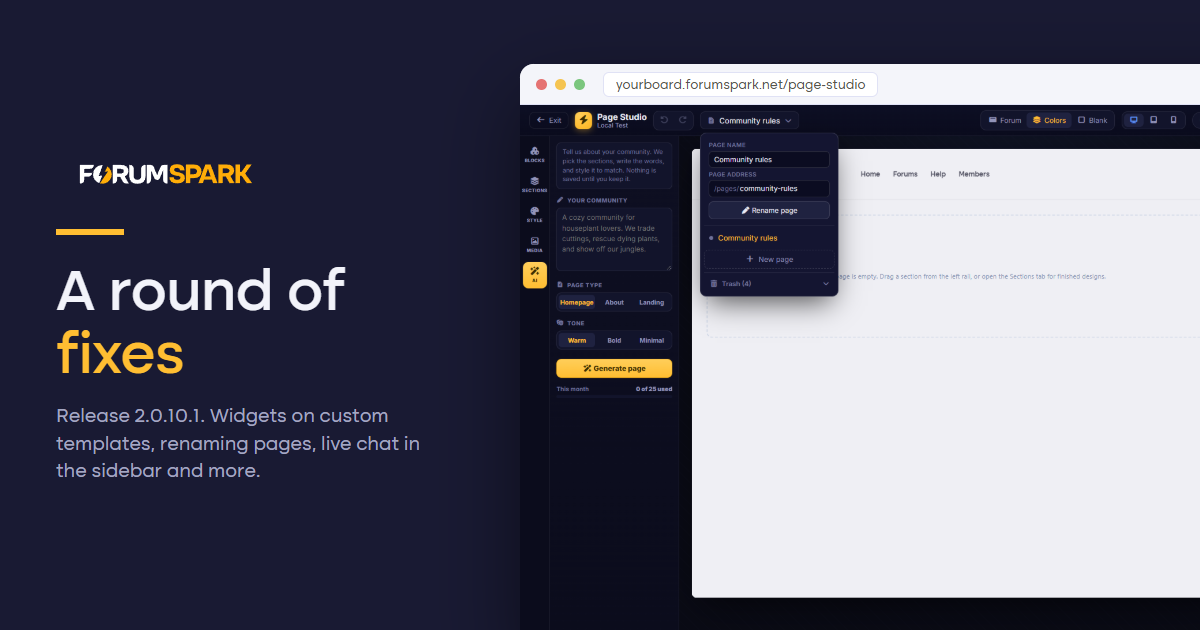
A round of fixes

A round of fixes

No new features this time, which is why this one is 2.0.10.1 and not 2.0.11. It is a round of fixes for things you reported in the support forum and the live chat, plus a few errors our monitoring caught before most of you ran into them.Widgets between categories, now with custom templatesWidgets placed between two categories did not show up on boards with a custom index template, because that template draws its own list of categories. They now appear after their category on every board, stock o...

Continue reading on the blog

1 reply 369 Read more →
Cedric ·ForumSpark Headlines ·1 month ago
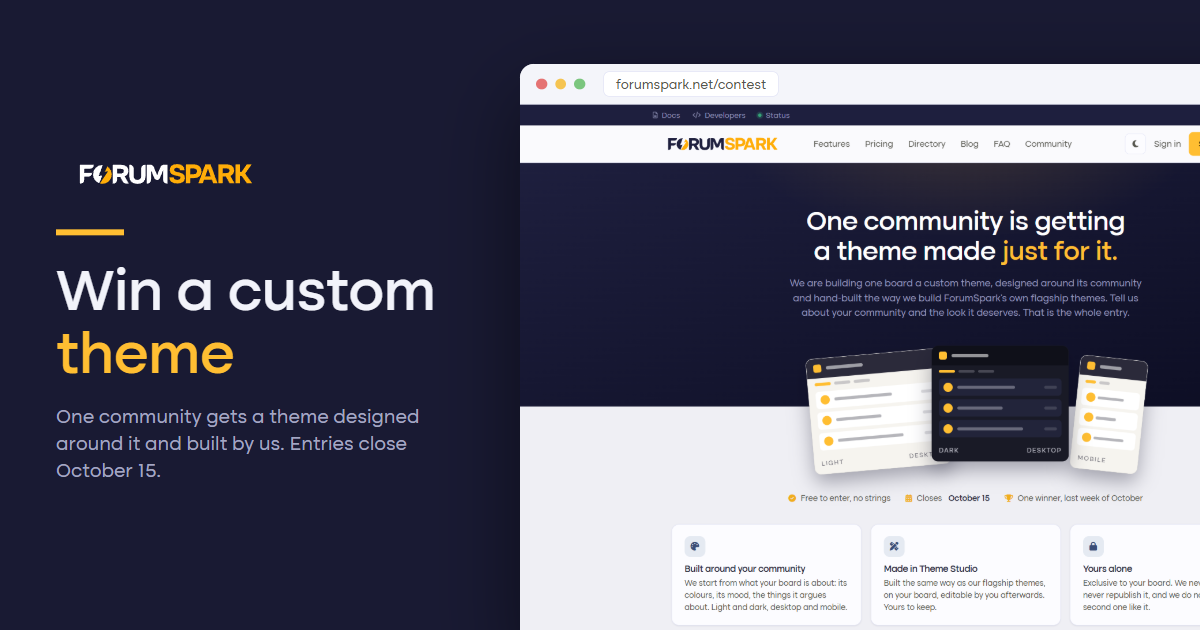
Enter to win a custom theme!

Enter to win a custom theme!

We picked the Home for Life winners and closed the contest. And I want to admit something: reading your entries was the best part of the whole contest. Not the picking. The reading. Dozens of people describing a place that matters to them, in a few honest sentences. So we are doing it again, and this time the prize is something we can get creative with!We are building one community a custom theme.The prizeOne board gets a theme designed around its community and built by us. We start from what yo...

Continue reading on the blog

11 replies 432 Read more →
Cedric ·ForumSpark Headlines ·2 weeks ago
Coming from ProBoards? Your community. Your data. Always.

You may have seen some of the discussion around ProBoards' recently updated Terms of Service.

One change in particular has understandably caught the attention of community owners. Their new terms grant ProBoards a perpetual, irrevocable and sublicensable license to user content, including specifically for large language model development and AI training by ProBoards and/or its partners.

That isn't how we believe community hosting should work.

When you build a community on ForumSpark, your community's data remains your data. We don't claim the right to use your members' discussions to train AI models, and we don't believe choosing a hosted platform should mean giving up control over what you've spent years building.

You can leave ForumSpark.

Obviously, we'd rather you didn't. 😄

But if you ever decide ForumSpark is no longer right for you, you can export your community data in the AdminCP. We don't believe in making it deliberately difficult to leave just because we happen to host the database.

A community can contain years of discussions, friendships, knowledge, photographs and history. The hosting company shouldn't be the thing standing between an administrator and that history.

Coming from ProBoards?

We've already seen community owners discussing alternatives following the changes. And worse, even closing their communities.

Migrating away from ProBoards isn't necessarily straightforward because of how their platform works, but if you're considering starting again on ForumSpark, talk to us.

We'll do our best to help you figure out what can be brought across, what options are available and how to get your community running again without simply leaving you to figure everything out yourself.

We're not going to pretend every ProBoards community can magically be transferred perfectly. In some cases, starting fresh may genuinely be the most practical option.

But we'll help where we can.

ForumSpark was built around a pretty simple idea:

You should be able to build your community without giving ownership of its future to the company hosting it.

Your members.
Your discussions.
Your community.
Your data.

5 replies 661 Read more →
Cedric ·ForumSpark Headlines ·3 weeks ago
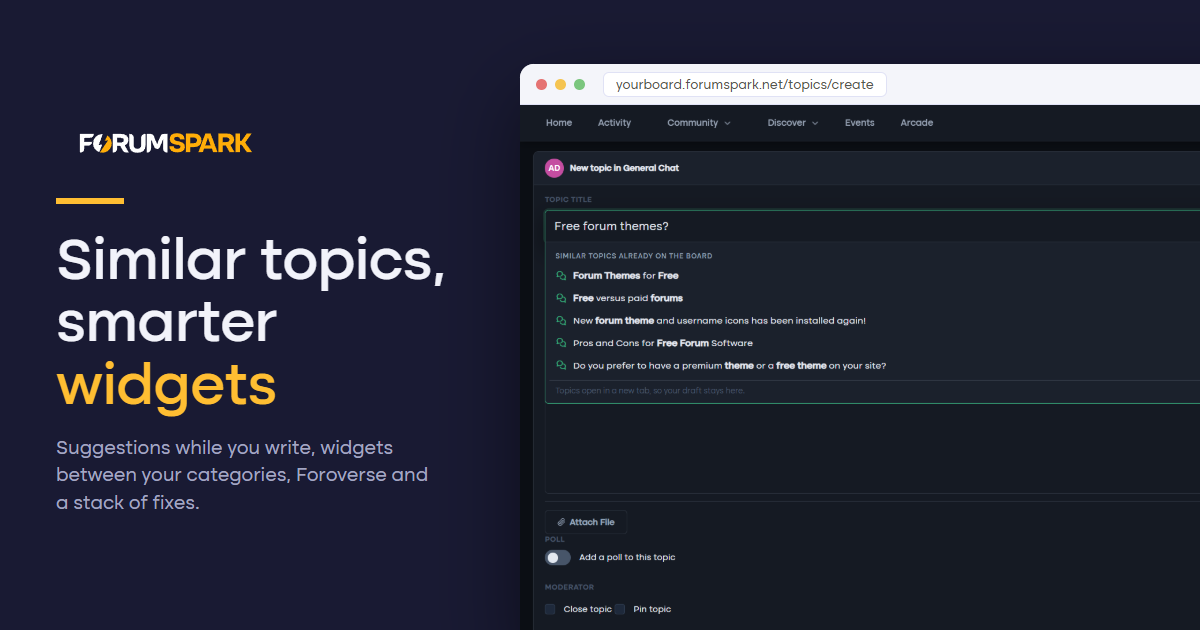
Similar topics, smarter widgets and Foroverse

Similar topics, smarter widgets and Foroverse

Half of this release came straight from your feedback topics. Members now see similar topics while they type a new title, widgets can sit between your categories, pages decide for themselves whether they want a sidebar, and Foroverse is coming soon. Around that, conversations lets you delete your own PMs, post counts keep themselves honest, and a long list of reported bugs is gone.

Similar topics while you write

Duplicate topics are the oldest problem on any forum. As soon as a new topic title has two meaningful words, a dropdown opens right under the title field with up to five existing topics that cover the same ground, the matching words in bold, with their forum and reply count.

It is on for every board. You can switch it off under Settings, Preferences, Content & Posting, Suggest similar topics.

Widgets between your categories

Your board index used to have two places for wide widgets: above the board and below it. Now every gap between two categories is a widget area too. Open the Widget Studio and you will see a drop zone between each pair of categories, and a new Between categories group in the Layout panel.

Each spot has its own layout:

  • Stacked. Widgets one under the other at full width, the way they look above the board.

  • Category. The spot looks and collapses like a forum category, with a title you choose, and its widgets sit side by side inside it as columns.

  • Side by side. Widgets keep their own boxes and line up in a row, two or three across, stacking on phones.

It works in both the list and grid views of your index. If you delete a category, its widgets move below the board instead of disappearing.

Pages: your sidebar, your call

Every page now decides whether it shows the sidebar. Classic pages get a Show sidebar switch in the page form, on by default, and turning it off gives you a clean full-width page. Page Studio pages in Forum chrome get a Sidebar toggle in the top bar, off by default so nothing changes on the pages you already built.

Widgets can also be aimed at specific pages. In the Widget Studio, a widget's settings have a new Only on these pages list. Tick the pages it belongs on and it shows there and nowhere else. Leave them all unticked and it appears on every page, as before.

Foroverse

Foroverse is a free extension that connects your board to foroverse.com, so your public topics can be discovered by people who have never heard of your forum. Install it from the Extensions page and a short wizard walks you through connecting.

  • You choose what is shared. Only public forums can be shared, and you pick which ones. Topics waiting for approval and posts from spammers stay home.

  • Linked accounts. Members can link their ForumSpark account and sign in with Foroverse. New sign ups go through the same checks as your normal registration form.

  • Posting from Foroverse. When you switch it on, linked members can reply, start topics and like posts from Foroverse under their own account, with every rule of your board still applying. Both posting and likes are off until you turn them on.

Please note: Foroverse is not launched just yet. But we’re very close!

Conversations: delete what you want

You can now delete a whole conversation from your inbox, from the conversation's menu, the inbox list or the chat dock. It disappears from your side only, the other members keep their copy, and if someone writes again it comes back with just the new messages.

Your own messages can also be deleted for everyone, at any time. Before, that option only appeared for the first five minutes. On phones and tablets the message menu button is now always visible, so you no longer need a mouse to find it.

Post counts that stay right

Member post counts could drift away from the posts that actually exist, especially after deleting posts. A nightly recount corrects every member's post and topic count on every board, and ranks follow along. If you do not want to wait for the night, Recount post counts on the Member search page in the ACP does it right away as of now.

Smaller fixes

  • New members, including those joining through ForumSpark sign in, no longer land in the Guests group. A failed save on the Preferences page could quietly set Guests as the default group. That is fixed, the default group can no longer be the guest group, and we repaired the boards it had already happened to.

  • Opening a notification for a deleted topic no longer stacks copies of the page inside each other. (Infinity loop)

  • Pages keep their Show in menu setting when you edit them, and switching it back on works again.

  • Deleting a page frees its SEO URL, so you can use it again for a new page.

  • A widget's custom CSS can be cleared from the ACP widget manager.

  • Typing something like 1,5 as a credits adjustment shows a clear message instead of an error page.

  • The label title field no longer claims BB Code is allowed. Use the label colours to style it instead.

Originally published on the ForumSpark blog

14 replies 419 Read more →
Cedric ·ForumSpark Headlines ·1 month ago
The Arcade is open

The Arcade is open

Every forum from the early 2000s worth its salt had an arcade: a page of small games, a high score table, and one member who would not let go of the top spot. ForumSpark boards can have one again, and it is the headline of this release. The Arcade is openThe Arcade is a free extension you install from the Extensions page. It comes with 55 games ready to play: puzzle, action, cards, classics and skill games, all running on your board in a sandboxed frame, nothing to download, nothing to configure...

Continue reading on the blog

16 replies 569 Read more →
Cedric ·ForumSpark Headlines ·1 month ago
Grid and Feed: two new looks for your forum home

Grid and Feed: two new looks for your forum home

Not every board wants to have a classic list of categories and forums. While it is dense and familiar, some communities have the desire to customize beyond traditional listings.What changedThe forum home now has four layouts: the classic List, the denser Compact, a new Grid of live section cards with cover images, and a Feed that turns the whole board into one scrollable stream you can reply to without leaving the page. You choose which layouts your board offers and which one it opens on, and ev...

Continue reading on the blog

14 replies 519 Read more →
Cedric ·ForumSpark Headlines ·1 month ago
Dock, Paper and links that play

Dock, Paper and links that play

The editor is one of the most used parts of any community, so a good part of this release is focused there. You can now choose between three different editor layouts, pasted video and audio links can automatically turn into players, checklists can be shared with everyone in a topic, and we finally added proper logo size controls.

There are also a handful of fixes based on reports we received.

Choose how your members write

Until now, every board used the same editor layout: toolbar on top, title above it where needed, and the controls underneath.

That layout is still available, but you can now choose between three different editor styles from the Editor page in your admin panel. Your choice applies everywhere members write, including quick replies, new topics, edits and private messages.

  • Classic. The editor you already know today, with the full toolbar at the top.

  • Dock. The writing area comes first, with the most commonly used tools underneath next to the post button. Bold, italic, underline, images, GIFs, emoji, lists and quotes are always available, while the plus button opens everything else including text size, alignment, colours, highlights, numbered lists, shared checklists, tables, spoilers, code blocks, media, dividers, find and replace, HTML source and attachments. When your cursor is inside a table, the panel also adds the available row and column controls. Quick reply under a topic stays as a small one-line bar until someone clicks it.

  • Paper. The cleanest of the three. There is no permanent toolbar, apart from emoji and GIF controls in the corner. Select some text and a small floating toolbar appears with formatting options such as bold, italic, underline, strikethrough, code, links, headings, quotes and colours. On an empty line, type / or click the button in the margin to open the full command list for images, media, tables, checklists, headings and more.

If you prefer having every option visible, Classic will probably remain your choice. If you want something cleaner without hiding too much, Dock sits nicely in the middle. Paper is there for boards that want the editor to stay out of the way as much as possible.

Paste a link, get a player

Paste a YouTube, Vimeo, Dailymotion, Streamable, Loom, Twitch, TikTok, Facebook, Odysee, Spotify or SoundCloud link into a post and ForumSpark will automatically turn it into a player.

The embeds are lazy loaded and privacy-friendly. Until someone actually presses play, the page uses the preview information served through ForumSpark and does not load the full player from the provider.

This keeps topic pages lighter and avoids contacting services such as YouTube simply because someone opened a topic.

Boards that want wider support can enable Recognise all other supported media sites under Media on the Editor page. This enables support for a much larger list of media providers.

Checklists everyone can tick

Checklists is new to the editor.

When a checklist is shared, anyone who is allowed to reply to the topic can tick items without needing to edit the original post. Each item shows who completed it and when, and changes update for everyone viewing the topic.

When a checklist isn’t shared, only the author can edit the post and check an item.

Your logo, at the size you want

Theme Studio now includes proper logo sizing controls.

Under the light and dark logo uploads you will find two sliders: one controls the desktop header size and the other controls the mobile header size.

Move the slider and the preview updates immediately. Save it and that is the size your board will use.

This means you no longer need to keep resizing the original image or use custom css just to get it looking right, and mobile can use a different size from desktop.

If you leave the sliders untouched, your current logo sizing stays exactly as it is today.

Fixes worth knowing about

  • Trust levels. New members could sometimes be told to remove a link or image even when they had not added one themselves. This could happen when quoting another post containing mentions, links or images, and typed emoji could also be counted incorrectly. The trust level checks now only look at the content the member actually added themselves.

  • Shoutbox. The shoutbox now stays properly pinned to the newest message when images or fonts finish loading after the page. If someone has manually scrolled up to read older messages, their position is left alone.

  • Link previews. If generating a link preview failed partway through, it could sometimes remain stuck without a title or image. Failed previews will now retry.

  • Moderator dashboard. Forum moderators could receive an error when a profile report was waiting alongside normal content reports. Fixed.

  • Custom domains. Temporary DNS issues no longer count as a failed domain verification. ForumSpark will simply try again later.

You can try the new editor styles from the Editor page in your admin panel. Give Dock or Paper a try on your own board and let us know which one you end up preferring.

Meet the ForumSpark team

We have also expanded the ForumSpark team a little, so I wanted to properly introduce everyone and explain what they will be helping with.

Kathy will mainly be working with community owners and support. She may reach out from time to time to see how things are going, what you are missing or if there is anything we can help with. She will also be helping with support tickets and getting new communities started.

Shawn will be working on guides and content for ForumSpark. You will start seeing regular posts from him covering ways to improve and grow your community. He will also help review abuse reports that are escalated to ForumSpark.

Mace has already been involved with ForumSpark for a while, but is worth properly mentioning here. She works through the interface looking for things that can be improved or made easier to use, and also helps run our marketing campaigns.

Al will be helping with marketing and support. He will also be involved when we are discussing future plans and features, particularly from the side of what community owners are actually asking for and using.

For you, this should mainly mean quicker support, more useful guides, more regular improvements around the platform and more direct contact between ForumSpark and the people actually running communities on it.

You may also see members of the team joining or posting in your community every now and then as regular members.

Feel free to say hello when they drop by.

Originally published on the ForumSpark blog

4 replies 316 Read more →
Cedric ·ForumSpark Headlines ·2 months ago
We are giving three communities a home for life

Two weeks ago 2.0 went out the door, and the response has honestly been the best part of building this thing. People upgraded, people started new boards, and people sent bug reports at two in the morning. I want to say thank you in a way that actually means something.

So here it is. We are giving three communities a home for life.

The prize

Three board owners get the Starter plan for free, for as long as we exist. Not a year, not a discount code. Starter, forever, on the house.

And it does not matter where you are today. Run a classic v1 board? If you win, we move you to 2.0 together, hands on, and then it is yours for life. Halfway through a 2.0 trial? Your trial simply never ends. Never started a forum because paying for a hobby felt like a step too far? Pitch me the community you have been carrying around, and if you win it starts life on Starter.

Tell us your story

Tell us about your community in a few sentences. What it is about, who it is for, and what a permanent home would mean for it. That is the whole entry. No purchase, no credit card, etc.

I read every entry myself and pick the three I believe in most. Honest warning: that makes this a judged contest, not a raffle. A community of twelve people who genuinely care about each other beats a big number every time in my book.

The details

Entries close August 26 at 23:59 CET. The three winners are announced here on the blog in the first week of September, and I will email them personally. One entry per person, ForumSpark staff cannot enter, and the rest of the small print lives on the contest page.

Tell me about your community. It takes five minutes.

Enter the contest

Originally published on the ForumSpark blog

7 replies 489 Read more →
Cedric ·ForumSpark Headlines ·1 month ago
Expected downtime August 26th

A brief downtime is to be expected tomorrow due to server maintenance and upgrading hardware. Total downtime shouldn’t take longer than 10 minutes.

CEST: 10:00 AM
BST: 9:00 AM
EDT: 4:00 AM
CDT: 3:00 AM

2 replies 247 Read more →
Cedric ·ForumSpark Headlines ·2 months ago
The new Live chat and rebuilt polls

The new Live chat and rebuilt polls

Some parts of ForumSpark get rebuilt every few months. Others quietly do their job for years without anyone touching them. The shoutbox and polls belong firmly to the second group. Neither has seen a decent improvement since ForumSpark was originally built, and to be honest, we kind of forgot about polls entirely when we designed the 2.0 boards. The poll panel was still the same two column table from the very first version, sitting on top of an otherwise modern topic page. Both have now been reb...

Continue reading on the blog

2 replies 317 Read more →
Cedric ·ForumSpark Headlines ·2 months ago
Meet Aegis: spam defense across every board

Meet Aegis: spam defense across every board

If you run a board on ForumSpark, spam has probably never been high on your list of worries. That is by design. Every board sits behind Cloudflare, the platform is built to keep bad traffic out, and between our signup checks and a few quiet defenses working in the background, it is rare for a spammer to register and cause any real trouble. We like it that way. Today it gets even better.

What changed

When one board bans a spammer, every board on ForumSpark is now protected from them. Automatically, and without you lifting a finger.

The defense you already had

Before the new part, it is worth saying what was already there. Every signup runs through a honeypot that quietly traps automated bots, a reputation check against StopForumSpam, a disposable email filter, and rate limits that stop anyone hammering the registration form. Trust levels keep brand new members from posting links or images until they have earned it. None of that is going away. It is the floor we build on.

Meet Aegis

Here is the idea. ForumSpark hosts hundreds of communities, and every day their moderators make good calls about who is a spammer. Until now, each of those calls only helped one board. Someone banned on a cycling forum could turn around and register on a gaming forum a minute later. Aegis changes that.

When any board bans a spammer, flags one, or adds a ban filter, a signal is sent to the platform with the details that matter: the email, the IP, the domain, the username. Aegis gathers those signals, scores them by how many independent boards have reported the same bad actor, and confirms the ones it is sure about. A confirmed spammer goes onto a shared blocklist that protects every board at once.

  • Blocked at signup across every board, by email, domain, IP, IP range or username.

  • Blocked at the door for confirmed bad IP addresses, so they cannot even browse.

  • Verified first using reports from several boards plus StopForumSpam, so one mistake never bans someone everywhere.

  • Always reversible, and any board can add its own local exceptions.

It is the same idea Cloudflare uses at internet scale, brought inside ForumSpark and powered entirely by our own community of admins. The more the network moderates, the smarter everyone's protection becomes.

14 Defenses in the stack 6 Ways to block a spammer 0 Setup on your side

A ban system that does a lot more

Aegis needed a stronger foundation, so the ban tools in your admin panel were rebuilt along the way.

  • Ban filters block an email, an email domain, an IP, an IP range or an entire country from registering or browsing.

  • Also block when you ban a member, so their email and known IP addresses are shut out in the same click.

  • A full history of who was banned, by whom and when, instead of records quietly vanishing when a ban is lifted.

  • A triggers log that shows every time a ban or filter actually stopped someone, with a last seen time on each.

  • Network controls so your board decides whether it contributes to Aegis, whether it is protected by it, and which values to always allow.

A new challenge at the door

One gap was left. A brand new bot from an address nobody had reported yet could still fill in the form correctly and slip past. So we added Cloudflare Turnstile, a modern, privacy friendly challenge that never makes anyone pick out traffic lights.

The best part is that almost nobody will ever see it. Turnstile only appears for visitors whose address Aegis has already flagged as suspicious. Real members register exactly as before, with nothing extra to solve.

What you need to do

Nothing. All of this is live and on by default. Your board already contributes to the network and is already protected by it. If you ever want to change that, or add your own exceptions, it is all under Bans in your admin panel, on the new Network tab. Everything else simply runs, the way good security should.

A better editor to write in

This release also ships some love to the editor. You can switch each feature on or off from the new Editor page in your admin panel.

  • Search and replace, docked under the toolbar. Press Ctrl F, jump between matches, replace one or all of them.

  • Image controls on every picture you place: click it to set the size and alignment.

  • Spoilers that blur their content behind a reveal, for endings and puzzle answers.

  • Code blocks with syntax highlighting and a language picker, plus tables that finally behave on mobile.

  • Link cards: paste a link on its own line and it unfurls into a rich preview card, for topics on your own board as well as external pages.

  • A GIF picker, smart typing and more: proper quotes and dashes as you type, emoticon codes that become the real thing, undo and redo buttons.

A small quality of life touch for admins to match: emoticons can now be uploaded straight into the emoticon manager, drag and drop, instead of linking it.

Performance updates

Performance and security is something I take very seriously and something I'm never happy about. There’s been a few improvements where the heaviest pages on a board, the busy topic lists and members view, now do roughly half the database work they used to. Thus they render noticeably faster because of it.

2x Faster page renders 0 Features changed 0 Downtime for members

Spam was never yours to fight alone. Now the whole network has your back.

Start your free ForumSpark board

Originally published on the ForumSpark blog

9 replies 388 Read more →
Cedric ·ForumSpark Headlines ·2 months ago
Translate your community

Translate your community

One thing ForumSpark was still missing was the ability to translate your community or simply change certain wording to suit your needs. Until now, changing interface text usually meant working around it with CSS. That is no longer necessary.

This update brings full language management to every ForumSpark board.

Translate directly from your forum

The easiest way to translate your board is through Live Translate.

Open Languages under Appearance in your admin panel and press Live Translate. You will return to your forum with every interface string outlined.

Long-press any text to open the editor, enter your translation and save it. Every matching occurrence on the page updates immediately.

Amber outlines show strings that still need translating, while green means they are done. Normal clicks continue to work, so you can browse through your community and translate each page as you go.

The counter in the translation bar shows how many untranslated strings remain on the current page. Click it to open the full list and work through them one by one without having to find each string on the page.

Tooltips and other text that is not directly visible are listed separately under hidden strings, so those can be translated too.

Or use the string editor

Prefer having everything in one place? The string editor shows the original English string next to your translation.

You can filter untranslated strings or browse them by area, including emails and notifications.

Placeholders such as :name are validated automatically, preventing you from accidentally removing information that needs to be inserted later.

Custom menu items and widget titles are included as well.

Bring your own translators

Each language can be exported as a single JSON file. You can export the entire language or only the strings that are still missing.

Send the file to a translator, edit it yourself or work on it however you prefer, then import it back into ForumSpark. Everything is validated before it is saved, and you receive a full report of anything that needs your attention.

New languages begin as drafts and can only be previewed by administrators. Nothing becomes visible to your members until you are ready.

What your members see

You can set one default language for the entire board or allow members to choose their own through a selector next to the theme selector.

Dates and times adjust automatically. A Dutch community, for example, will show 13 seconden geleden without you having to translate it yourself.

Member-created content is never translated or changed. This only applies to the interface around it.

Languages are available today on every board and every plan.

Open Appearance, choose Languages, add your language and press Live Translate to get started. You can also view the full guide here.

Should you find any strings that cannot be translated, please let us know through Support.

Also in this update

Flagging a member as a spammer now works as expected.

Their content is immediately hidden from the public, and their profile clearly states:

This member is flagged as a spammer. Their content is hidden from the forum.

Staff can still view everything through a red overlay, allowing you to review what was posted. You can delete the content immediately or leave it to the automatic cleanup, which removes content from flagged spammers after 48 hours.

The Activity page also received some attention. Topic titles and labels now sit together more neatly, the page behaves properly on mobile, and previews show more content before being truncated.

And finally, ForumSpark is officially out of beta. Yay! 🤗

Originally published on the ForumSpark blog

4 replies 396 Read more →
Cedric ·ForumSpark Headlines ·2 months ago
Events is live

Events is live

A few board owners asked us for events. They were running meetups out of pinned topics, keeping the guest list in the first post and bumping it by hand. That deserved better, so we built it properly. Events is the headline, but this release also brings email for private messages, a new moderation menu on topics, and a reorganised admin panel navigation.

What Events does

You publish events on your board. Members RSVP going, maybe or declined. Set a capacity and we hold the seats safely, so nothing oversells, and everyone attending gets a reminder before it starts.

Outside guests are handled. Attendees can bring named guests, and you can invite people by email with a confirm or decline link, no account needed. Every event has calendar buttons for Google, Outlook and Apple, so it lands in everyone's own calendar too.

Run the day from the attendee list and export it to CSV. Group events into categories with their own icon and colour, give events their own discussion topics, and let the Upcoming Events widget surface the next few anywhere on your board.

  • A list and a month view, so members always see what is coming.

  • Capacity that holds. Places left are counted live and nothing oversells.

  • Guests without accounts, invited by email with one click to confirm or decline.

  • Reminders included. Attendees hear about it before it starts, automatically.

Included from Launch

Events ships with the Launch plan alongside Blog, Gallery, Marketplace and Page Studio. You will find it in your admin panel under Applications, ready to switch on. Go and schedule something your next big event.

Private messages now reach the inbox

Members get an email when someone sends them a private message: who wrote, the conversation title and a short preview. It is on by default and every member can switch it off in their notification settings. A burst of messages becomes one email, and if the conversation has already been read on the board, no email goes out at all.

Moderate without leaving the topic

Moderators get a Moderate menu on the topic itself: close or open, pin or unpin, move, merge and delete, all without bouncing back to the topic list.

An redesigned admin panel navigation

Due to it being quite long, the admin panel navigation has been reorganised into clear sections, from Settings and Community through to Applications and System. Hover a section to peek inside, click to jump in, and whatever page you open, the menu highlights where you are.

Better on phones

Various fixes have been done mobile, the New Topic button is back on the mobile topic list, the forum header takes half the space it used to, bulk moderation works from a phone, etc. We also clicked through every page on desktop and mobile this week and repaired what we found along the way, including private message editing, hard to read gray text in light mode, and a stubborn redirect on the activity page. As always, feel free to leave feedback and recommend the next big thing!

Not running on ForumSpark yet? Start a board today and host your first event this week.

Create your forum

Originally published on the ForumSpark blog

2 replies 336 Read more →
Cedric ·ForumSpark Headlines ·2 months ago
Custom domain issue resolved

Hi everyone,

Over the past days, some boards using a custom domain were temporarily unreachable. Visitors saw a browser security warning or an offline page instead of the forum.

The cause was an internal check on our proxy that silently blocked SSL certificate renewals for custom domains. As certificates expired, those domains stopped loading. Board data and visitor security were never at risk: no content was exposed or lost.

I have deployed a fix and certificate renewals are running normally again. Affected domains are automatically recovered, so no action is needed.

Apologies for the disruption,

Cedric

Cedric ·ForumSpark Headlines ·2 months ago
Add-ons, automation and our Marketplace

Thanks to some great feedback, ForumSpark is in a much better shape than ever. But we're not slowing down. On the contrary...

The Marketplace is now the official place for releases

From today we will start using our official Marketplace on the support board. I will be converting all current resources to the Marketplace. Everything released there gets automatically linked in the Extension Directory and gets its own topic in the forums, so you can follow and discuss new stuff like before. One place to release, visible everywhere.

Template add-ons

The Extension Directory in your admin panel now has template add-ons. These are small packs you install in one click: template snippets, profile fields and styling, no code needed. We made five official ones to get you started: Character Sheets, Gamer Tags, Post Rail Flair, Profile Showcase and Thread Meta. Install one and it just works. Uninstall it and your board is exactly like before. And further improve to your preference.

And if you build something nice yourself in Custom Templates, you can now export it as an add-on and publish it through the developer portal. Your work can end up on every board.

Automation

There is a new Automation page in the admin panel, free on every 2.0 board. You make rules like "when a topic reaches 50 replies, add the Hot label" or "when a report comes in, lock the topic and email me". Pick a trigger, add conditions, add actions, done. Every rule keeps its own run history so you can see exactly what it did. You are free to suggest new rules anytime.

Developer boards

If you build extensions or themes, you can now request a free developer board from the developer portal. It is a real board with every plan feature turned on, just for building and testing. You can install your draft packages on it directly, and templates show detailed errors instead of failing silently.

App data

For developers: installed apps can now push live data to a board through the API, and templates can show it. Think a Discord widget with a real online count, or your game server status in the post rail. Your code runs on your own server, the board just shows the numbers.

Docs

Guides for all of this are up. Admin guides in the normal docs, developer guides (with a few examples) on the developer portal.

Have fun with it, and show me what you build.

Originally published on the ForumSpark blog

1 reply 282 Read more →
Cedric ·ForumSpark Headlines ·3 months ago
ForumSpark 2.0.1 BETA Release

Greetings all,

Since the release yesterday I have continued to do some fine tuning and minor fixes to ForumSpark 2. Here's a few fixes in 2.0.1:

  • Section description blank on save

  • Deleting default sections gave a server error

  • Post rail customization ignored in the topic view

  • Reaction, quote, and mention notifications linked to the first post instead of your post

  • Directory counted topics and posts together, now posts only

  • Active Topics page error on busy boards

  • Missing sub-forum options on the section delete page

  • Docs Search guide unreachable at its own address

That's it for today!

Originally published on the ForumSpark blog

7 replies 452 Read more →
Cedric ·ForumSpark Headlines ·3 months ago
ForumSpark 2.0 is here

ForumSpark 2.0 is here

I want to do this properly. Not a wall of bullet points, not a "we're thrilled to announce." Just me telling you what changed, the way I'd tell a friend over coffee or a beer.ForumSpark 2.0 has been the better part of almost a year of work, and it is easily the biggest thing I have ever built. So let me start with the part that matters most to the people who have been here a while.If you are already on ForumSpark, nothing gets taken awayA promise, not a launch-week softenerEvery forum running to...

Continue reading on the blog

19 replies 721 Read more →
Cedric ·ForumSpark Headlines ·6 months ago
A glimpse on ForumSpark 2.0

A glimpse on ForumSpark 2.0

A glimpse on ForumSpark 2.0

I'll keep this one relatively short, because I don't want to give too much away just yet - but there's enough to talk about that it felt wrong to stay quiet any longer. And I can't contain my excitement personally.ForumSpark 2.0 is in active development.As most of you know, Mace has recently joined...

Read the full article →

53 replies 2K Read more →
Cedric ·ForumSpark Headlines ·3 months ago
Meet the new Theme Studio

I have something exciting to share.

As you know, a great deal of our time goes into building features that make it easy to customize your ForumSpark community. Now, creating themes just got a whole lot easier.

It has always been possible to build stunning themes on ForumSpark, provided you know your way around CSS. With the new Theme Studio, that knowledge is no longer required. Designing a theme now takes just a few clicks, and the only real limit is your imagination. 😉

What you can do inside the studio:

  • Curated themes: A library of 18 ready-to-use themes you can apply in a single click, with many more arriving later this year.

  • From your logo: Upload an image or logo and the Studio pulls out its colors to build a theme around your brand.

  • Color tuner: Fine-tune hue, chroma, and lightness to craft a look that is completely your own.

  • Core palette: Click any of the core colors to reshape your forum's entire appearance in seconds.

  • Surprise me: Not sure where to start? Generate a brand-new theme with one click, then keep clicking to explore. There is even a Previous button to jump back to one you liked.

  • Smart Start: An AI-powered generator that builds a theme from a simple prompt, such as "Make me a retro-inspired theme with red colors."

This is just a taste of what is coming. Stay tuned!

3 replies 428 Read more →
Cedric ·ForumSpark Headlines ·4 months ago
Release 1.7.1

This is a small yet with great impact release. Something that needed to be done before resuming work on 2.0.

Performance

  • Significantly faster page loads across the site which most noticeable on mobile and for logged-in members. Achieved by edge-caching the theme stylesheet, minifying CSS, serving build assets with long-lived immutable caching, and loading real-time features only on pages that use them.

  • Faster topic and forum pages which eliminated repeated/redundant database queries on the busiest pages (topic view, forum index, navigation menus, online statistics).

  • Lighter pages for guests who aren't logged in and longer downloads the real-time messaging client they don't need.

  • Optimized avatars & images for uploaded avatars and widget images which are now automatically resized and converted to WebP, so they load much faster and use far less bandwidth.

  • Faster post reactions and activity feeds.

Bug Fixes

  • Dark mode avatars where a board's custom default avatar now shows correctly in dark mode (previously it fell back to initials).

  • Topic labels where you can now add or change a topic's label directly from within the thread.

  • Private message Toasts now show a proper, readable message instead of an internal code.

  • Theme editor were fixed on color and setting changes not saving correctly.

  • Real-time notifications & chat had a fix scoping so live notifications and chat are reliably delivered to the correct board.

  • Online (guests) list now ordered by most recently active first.

  • Mobile messaging changed when opening a conversation on a phone, the conversation now appears above your inbox list (no more scrolling past all your conversations to reach it).

As always, if you see anything off, feel free to let us know. 🙂

3 replies 502 Read more →
Cedric ·ForumSpark Headlines ·4 months ago
Release 1.7.0

Release 1.7.0

Release 1.7.0

We’re getting close to 2.0 now, and a lot of this release is groundwork to make that jump smoother and break less along the way.But it’s not all plumbing - there’s a big new feature for anyone who likes their board just so, a proper “install it like an app” upgrade, and a handful of quality-of-life...

Read the full article →

1 reply 377 Read more →
Cedric ·ForumSpark Headlines ·5 months ago
A small word of appreciation

Greetings all,

I take real pride and joy in knowing that ForumSpark gives people a place to build their own communities.

So far, it’s been an absolute pleasure seeing these communities come to life - places where people can connect in a more structured and meaningful way, much like the old days of forums, away from the endless doomscrolling and noise of today’s social platforms.

One of our goals with ForumSpark has always been to make community building more accessible. The knowledge gap keeps getting smaller, and that’s something we continue to work on every day.

Having managed communities for over two decades, I’ve seen just about everything this ecosystem has to offer and has been through. I know we still have a long way to go, but I feel fortunate to be able to provide this space of opportunity for everyone.

Since January, ForumSpark has continued to grow steadily, with around 40–50 new communities being created every month. Today, we’re proud to officially support over 300 communities.

There is still so much planned and so much more on the way, and I’m excited to share it all with you very soon.

So, a thank you from us is definitely in order.

While traditional forums have been on the decline for nearly 12 years, we still see a clear demand for a proper online community service. Our mission is to make that as accessible, reliable, and welcoming as possible for everyone involved. 😊

3 replies 508 Read more →
Cedric ·ForumSpark Headlines ·5 months ago
Release 1.6.0

Release 1.6.0

Release 1.6.0

I will try not to forget any new features we've now released on ForumSpark. As we are nearing 2.0, we've done some more preparations to make the development easier and break less stuff - we hope. This is a big one. There's a major new feature in Clubs, a member subscriptions system, a realtime layer...

Read the full article →

7 replies 498 Read more →
Cedric ·ForumSpark Headlines ·5 months ago
Live engagement indicators and toasts

I’m currently testing some new live features for ForumSpark. These are designed to replace parts of our existing polling system, which is currently used for things like notifications and direct messages.

The main drawback of polling is that it can be very CPU-heavy. As ForumSpark continues to grow, that is definitely something we need to keep in mind. By moving these kinds of live features away from constant server polling, ForumSpark can become more lightweight, faster, and more responsive.

It also helps us move closer to the more modern, app-like experience we want to build, rather than sticking too closely to traditional forum software. Innovation is important if we want to stay relevant and remain a step ahead.

Here are some of the live features currently being tested:

When you are viewing a topic and someone else is also viewing that same topic, an indicator will show this in real time (Notice also that we've removed the panel title and added a topic header):


When you are typing a reply in a topic and another member starts typing as well, a live typing indicator will appear.


When you are viewing a topic and another member replies, their reply will automatically appear above the quick reply box. No delays, no page refreshes. It just appears automatically.


When someone is typing a message in the chat dock, a typing indicator will also be shown there:


Live toast notifications will also be available in the bottom right corner:


This is all still very much in development, but it should be available sometime soon. 🙂

1 reply 471 Read more →
Load more
ForumSpark © 2023 - 2026 · ForumSpark.net · Terms