I run across a bug. With the Live Chat / Shoutbox on the side bar the Emoji drop down box gets cut off.
@Gizmo is the king of seasonal forum events. 🙂
Do any of you do this sort of thing?
Seasonal-boards, seasonal themes, seasonal contests, etc.
If so, tell us about it and what seasons you do on your forum.
You may have seen some of the discussion around ProBoards' recently updated Terms of Service.
One change in particular has understandably caught the attention of community owners. Their new terms grant ProBoards a perpetual, irrevocable and sublicensable license to user content, including specifically for large language model development and AI training by ProBoards and/or its partners.
That isn't how we believe community hosting should work.
When you build a community on ForumSpark, your community's data remains your data. We don't claim the right to use your members' discussions to train AI models, and we don't believe choosing a hosted platform should mean giving up control over what you've spent years building.
You can leave ForumSpark.
Obviously, we'd rather you didn't. 😄
But if you ever decide ForumSpark is no longer right for you, you can export your community data in the AdminCP. We don't believe in making it deliberately difficult to leave just because we happen to host the database.
A community can contain years of discussions, friendships, knowledge, photographs and history. The hosting company shouldn't be the thing standing between an administrator and that history.
Coming from ProBoards?
We've already seen community owners discussing alternatives following the changes. And worse, even closing their communities.
Migrating away from ProBoards isn't necessarily straightforward because of how their platform works, but if you're considering starting again on ForumSpark, talk to us.
We'll do our best to help you figure out what can be brought across, what options are available and how to get your community running again without simply leaving you to figure everything out yourself.
We're not going to pretend every ProBoards community can magically be transferred perfectly. In some cases, starting fresh may genuinely be the most practical option.
But we'll help where we can.
ForumSpark was built around a pretty simple idea:
You should be able to build your community without giving ownership of its future to the company hosting it.
Your members.
Your discussions.
Your community.
Your data.
That ghost town phase can break a very strong person mentally. You post a topic, refresh the page 20 times, nothing happened. Sometimes I purposely reply my own threads just to make the place look active. Consistency is the only thing that helped me because if you abandon the forum for one week, everywhere would look like abandoned estate. 🤣


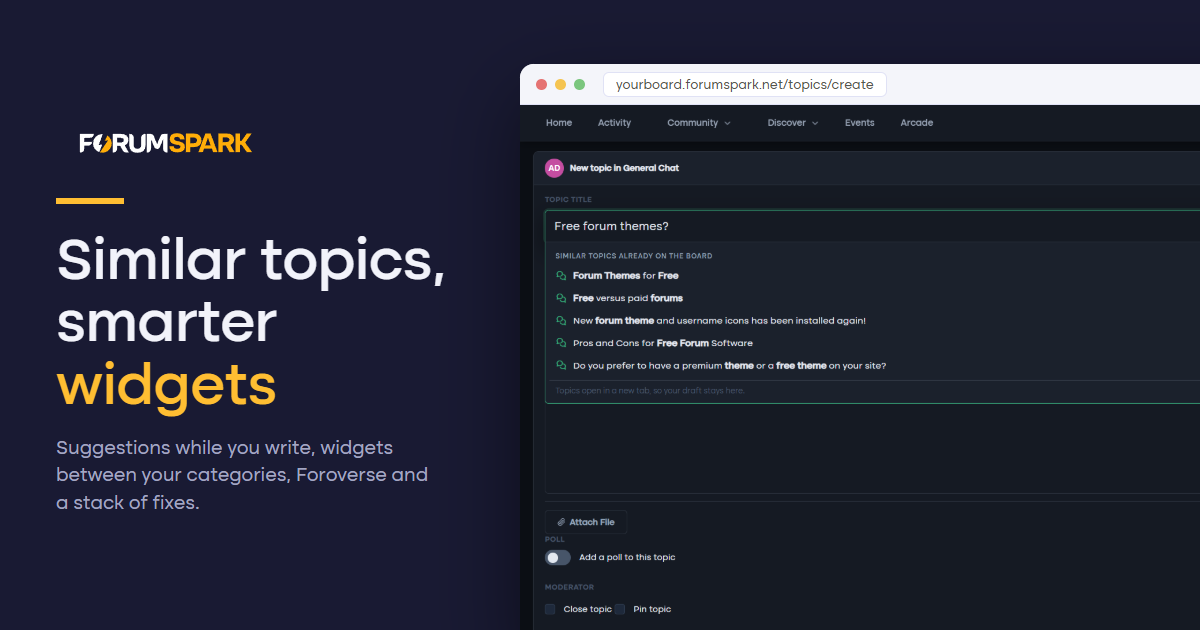
Half of this release came straight from your feedback topics. Members now see similar topics while they type a new title, widgets can sit between your categories, pages decide for themselves whether they want a sidebar, and Foroverse is coming soon. Around that, conversations lets you delete your own PMs, post counts keep themselves honest, and a long list of reported bugs is gone.
Similar topics while you write
Duplicate topics are the oldest problem on any forum. As soon as a new topic title has two meaningful words, a dropdown opens right under the title field with up to five existing topics that cover the same ground, the matching words in bold, with their forum and reply count.
It is on for every board. You can switch it off under Settings, Preferences, Content & Posting, Suggest similar topics.
Widgets between your categories
Your board index used to have two places for wide widgets: above the board and below it. Now every gap between two categories is a widget area too. Open the Widget Studio and you will see a drop zone between each pair of categories, and a new Between categories group in the Layout panel.
Each spot has its own layout:
Stacked. Widgets one under the other at full width, the way they look above the board.
Category. The spot looks and collapses like a forum category, with a title you choose, and its widgets sit side by side inside it as columns.
Side by side. Widgets keep their own boxes and line up in a row, two or three across, stacking on phones.
It works in both the list and grid views of your index. If you delete a category, its widgets move below the board instead of disappearing.
Pages: your sidebar, your call
Every page now decides whether it shows the sidebar. Classic pages get a Show sidebar switch in the page form, on by default, and turning it off gives you a clean full-width page. Page Studio pages in Forum chrome get a Sidebar toggle in the top bar, off by default so nothing changes on the pages you already built.
Widgets can also be aimed at specific pages. In the Widget Studio, a widget's settings have a new Only on these pages list. Tick the pages it belongs on and it shows there and nowhere else. Leave them all unticked and it appears on every page, as before.
Foroverse
Foroverse is a free extension that connects your board to foroverse.com, so your public topics can be discovered by people who have never heard of your forum. Install it from the Extensions page and a short wizard walks you through connecting.
You choose what is shared. Only public forums can be shared, and you pick which ones. Topics waiting for approval and posts from spammers stay home.
Linked accounts. Members can link their ForumSpark account and sign in with Foroverse. New sign ups go through the same checks as your normal registration form.
Posting from Foroverse. When you switch it on, linked members can reply, start topics and like posts from Foroverse under their own account, with every rule of your board still applying. Both posting and likes are off until you turn them on.
Please note: Foroverse is not launched just yet. But we’re very close!
Conversations: delete what you want
You can now delete a whole conversation from your inbox, from the conversation's menu, the inbox list or the chat dock. It disappears from your side only, the other members keep their copy, and if someone writes again it comes back with just the new messages.
Your own messages can also be deleted for everyone, at any time. Before, that option only appeared for the first five minutes. On phones and tablets the message menu button is now always visible, so you no longer need a mouse to find it.
Post counts that stay right
Member post counts could drift away from the posts that actually exist, especially after deleting posts. A nightly recount corrects every member's post and topic count on every board, and ranks follow along. If you do not want to wait for the night, Recount post counts on the Member search page in the ACP does it right away as of now.
Smaller fixes
New members, including those joining through ForumSpark sign in, no longer land in the Guests group. A failed save on the Preferences page could quietly set Guests as the default group. That is fixed, the default group can no longer be the guest group, and we repaired the boards it had already happened to.
Opening a notification for a deleted topic no longer stacks copies of the page inside each other. (Infinity loop)
Pages keep their Show in menu setting when you edit them, and switching it back on works again.
Deleting a page frees its SEO URL, so you can use it again for a new page.
A widget's custom CSS can be cleared from the ACP widget manager.
Typing something like 1,5 as a credits adjustment shows a clear message instead of an error page.
The label title field no longer claims BB Code is allowed. Use the label colours to style it instead.
I have a suggestion for a new feature when creating a thread. It would be useful if ForumSpark could display a list of similar or existing threads while you're typing the thread title.
I know there is already a widget that can show similar topics on the sidebar or below the board, but that doesn't really help when someone is in the process of writing a new topic.
Instead, a “Similar Threads” section could appear underneath the thread title as the user types, showing a few matching existing topics with links to them. This would give users the opportunity to check whether a discussion already exists before submitting their new thread.
I think this could be a really useful way to reduce duplicate topics and keep forums more organised.

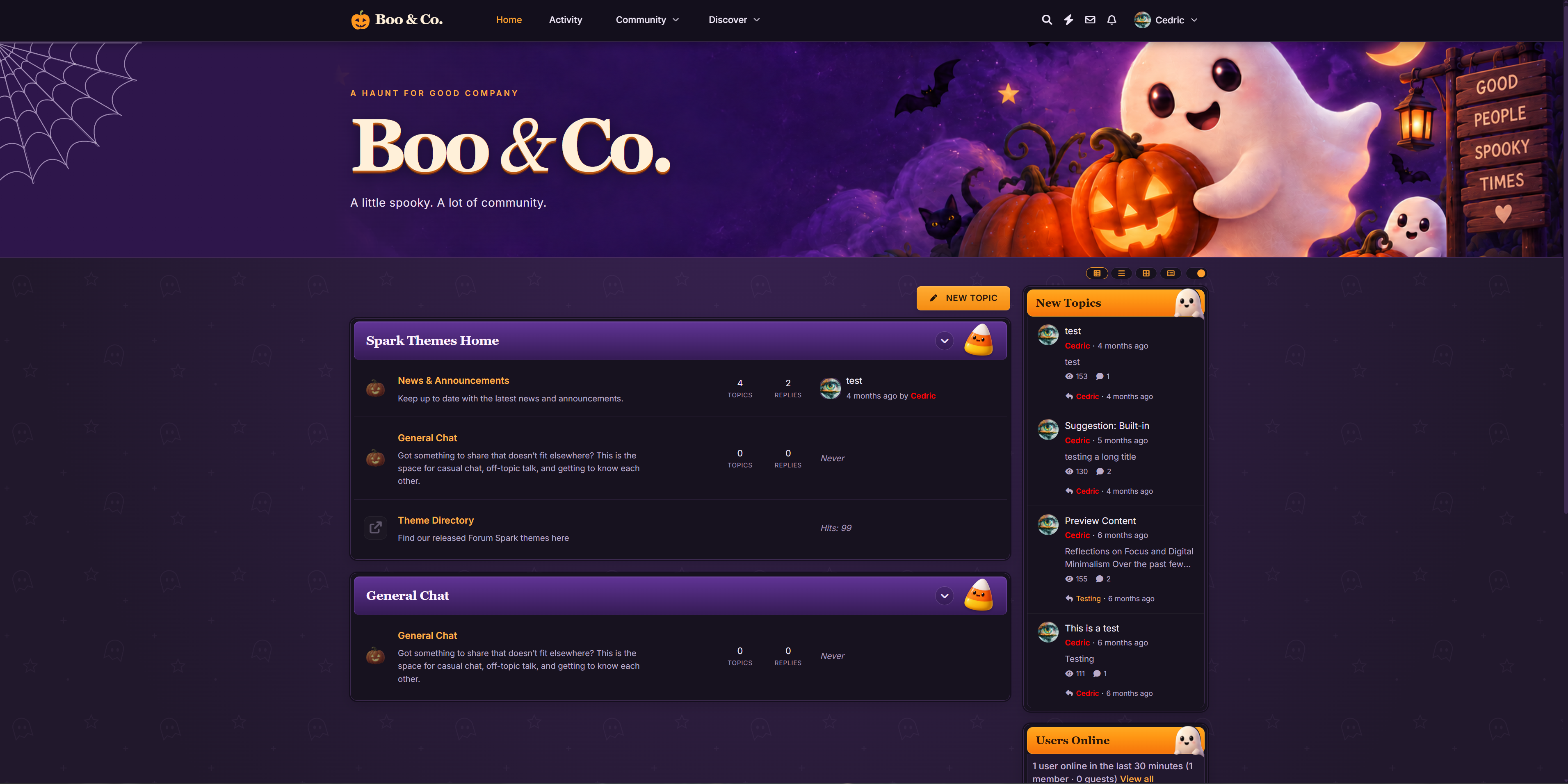
Boo & Co is now available in the marketplace.
Very fun, playful and sleek Halloween-themed theme. Select Boo & Co in theme selector.
View the product, screenshots and reviews
Use this topic for questions and discussion.
I had been thinking about making this for a few days but @Cedric beat me to it with his own appreciation thread.
I wanted to appreciate the time and effort Cedric has put in to make this a really nice alternative to paid and even free software. Thanks, @Cedric ! Keep up the good work. :)
I don’t watch a whole lot of TV, but I have been watching some of Amazon lately.
I’m addicted to the show FROM which is horror and gorier than it needs to be, but so much reminds me of LOST.
I’ve recently become addicted to Slow Horses which is on Apple TV. It’s actually more of a comedy-integrated espionage show for folks in the UK as it focuses on MI5 which is the domestic security service for the UK. I’ve been watching that every night catching up on all the seasons.
How about you all? Any TV shows you’re addicted to?
Working through everything that FS has to offer, a thing I’m seeing is that there isn’t a way to find a rss feed for topics, categories, and forums. I’m looking to see if there is a way without having to go through the use of API calls and Cloudflare Work thingy.
How do you feel about paying for forum posts?
Have you ever done paid posting at all? If so, how much have you paid, and was it worth it?
Do you think paid posters are deceptive to your real members at all?
I’d like to suggest an extension/add-on for ForumSpark that would automatically turn IMDb or TMDB links into properly formatted movie or TV show discussion threads.
How it could work
The extension could be configured for specific forums/categories. When a member posts an IMDb or TMDB URL in that forum, ForumSpark would recognise the link and automatically retrieve the relevant information and create a thread using a predefined template.
For example, someone could post:
https://www.imdb.com/title/...
or
https://www.themoviedb.org/movie/...
ForumSpark would identify the movie or TV show and automatically populate the thread with information such as:
🎬 Movie/TV show title
Poster/backdrop image
Release date/year
Genre
Runtime
Synopsis/overview
Director
Cast
IMDb rating
TMDB rating
IMDb/TMDB links
Trailer, where available
Example
A member submits an IMDb link in a designated "Movies" forum.
ForumSpark could automatically create something like:
The Matrix (1999)
[Movie Poster]
Overview: A computer hacker learns about the true nature of reality and his role in the war against its controllers.
Release Date: 31 March 1999
Genre: Action, Science Fiction
Runtime: 2h 16m
Director: The Wachowskis
IMDb Rating: 8.7/10
IMDb: [link]
TMDB: [link]
The member could then continue the thread by discussing the movie.
Configuration
It would be particularly useful if administrators could configure:
Which forums the feature is enabled in
IMDb links, TMDB links, or both
Whether a thread is automatically created or the user gets a preview first
The thread title format
Which information fields are displayed
Whether posters/images are included
Which user/account creates the thread
Whether duplicate movie/show threads are prevented
Whether members can edit/add to the generated information
Different templates for movies and TV shows
It could also potentially detect whether the link is a movie, TV series, TV episode, or other supported media type and use the appropriate template.
Why this would be useful
This would make it much easier for entertainment-focused forums to build organised movie and TV discussion databases without members having to manually enter all the information.
It would also encourage discussion because members could simply share an IMDb/TMDB link and have a complete discussion thread generated automatically.
I believe there is a similar concept available as a XenForo add-on, so it could be useful for ForumSpark to offer something similar as either a built-in extension or third-party add-on.
This could be especially useful for forums that have dedicated movie and TV discussion sections.
What's the cost of petrol like where you are? Here's it's getting very close to $3.50 NZD per litre.
If you were to see acts of illegal actions on your forum, would you report it to law enforcement?
Things like threats and stuff like that which serious enough to report.
But alternatively, you could just ban the people and not report it. But some might feel a forum owner has an obligation to report it.
What do you think?
Do you allow members who are under the age of 18 to be a part of your forum?
If so, why?
Facebook gets sued constantly because of safety issues for those under 18. Do you think forums are safe from those lawsuits? If you do, you should read the laws in your country as most countries offer 0% protection to you.
I updated one of my add-ons since an update released last week and instantly got hit with a database error, so the update itself is botched and now i't’s in limbo since it initiated the update process but couldn’t finish.
I’m seeing more and more reasons to migrate over to ForumSpark but my biggest issue is being able to afford the highest or 2nd highest tier……it’s a bit steep since i ain’t making much if anything at all from my forum at the moment. 🙁
I’ve been playing around with a little pumpkin carving page over at Spark Promotion, and now I want to see what everyone else can create! 👻
You don’t need an account to use it — just head over, pick your pumpkin colour, carve away, and see what you can come up with. There’s even an erase button if your carving goes horribly wrong. 😂
👉 Try the Pumpkin Carver:
https://sparkpromotion.net/pages/pumpkin
Once you’ve finished your masterpiece, save it and share your pumpkin design in this thread! 🧡
Let’s see who can create the creepiest, funniest, strangest or most impressive pumpkin. 🎃🔪
No artistic talent required — just don’t blame me if you accidentally create a pumpkin monster. 😈
I found a bug with creating a page in the ACP, you create and publish it set it to appear in the menu, you go and edit the page it resets the “Show in menu” setting to off everytime you edit it, i also had it not allow me to add it back to the menu once too.
I’m using Firefox on an Android tablet if it makes a difference.
For those of you who offer a premium membership plan on your forum, what benefits do you offer?
How do you make your premium membership stand out?
How much do you charge?
As the owner of your forum, what is the highest number of posts you’ve posted on the forum in one day?
What’s your typical number each day?
🚨 New Game Alert: Feed Gizmo! 🐹
Think you can keep Gizmo fed? There’s only one way to find out! 😈
Feed Gizmo is a brand-new little game from Spark Promotion where your mission is simple: keep the hungry gremlin happy and see how high you can get your score.
But be careful… Gizmo has a serious appetite! 😂
🎮 Play Feed Gizmo:
https://sparkpromotion.net/pages/feed-gizmo
It’s quick, it’s silly, and it might be just the distraction you need today. Give it a go and see if you can beat your score!
Here’s a rather interesting topic…
Do you ever find yourself having dreams about forums?
People dream about their work all the time. I know I do regularly.
I’ve also dreamed about making new forums and those new forums becoming really successful.
Have any of you had similar dreams?
I noticed that deleted posts seem to count towards a users total post count. How do I update a user’s post count to be accurate?
Hi, I’ve noticed an issue with labels when using BB Code in the label title.
For example, I have the title set as: [b][color=#FF0000]LIVE[/color][/b]
The label colour itself works correctly, but the BB Code is displayed as text instead of being rendered.
For example, it shows: [b][color=#FF0000]LIVE[/color][/b]
instead of:
LIVE
I’ve also tried it on the default ForumSpark theme, and it does exactly the same thing, so it doesn’t seem to be related to my custom theme or CSS.
The label settings say: The text shown on the label. BB Code is allowed.
So I’m wondering if BB Code is currently not being parsed when labels are displayed, or if there is something else needed to make it work.
The new themes very much! The winter and halloween ones are really good!
Hmm….🤔
Just seen this in the blog…
(Themes can be exported and imported as JSON files. That means you can build something, share it with someone else, and they can install it in seconds. This also makes it easy to back up your work or move a design between boards)
So does this mean my themes on my Jcink board can be imported? or have I got the wrong end of the stick?