

Attachments and storage
Members attach screenshots to bug reports, art to showcases, files to resources. This guide covers the two sides of that: the rules for what may be uploaded, and the storage those uploads live in.
The attachment rules
In Configuration, then Settings, on the Content & Posting tab, you control attachments: whether they're allowed at all, the maximum size per file, and the list of allowed file types. The type list is your safety filter; images and common documents are a sensible default, and you can widen it if your community trades save files or mods.
The File Manager
yourboard.forumspark.net/admin/files
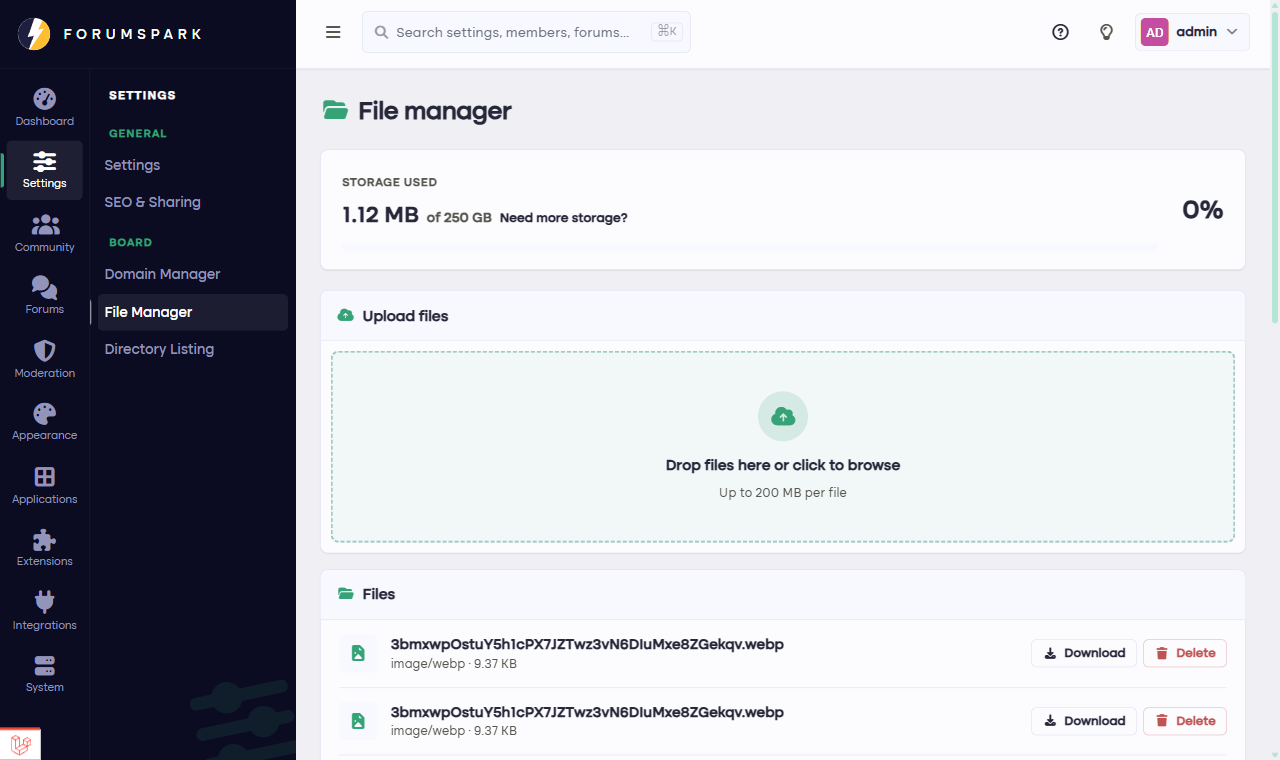
Overview, then File Manager: everything your board stores.
The File Manager in the Overview group shows everything your board has stored: attachments, avatars, theme images, gallery uploads. You can browse it and remove files that shouldn't be there, and it shows how much of your storage you've used.
How storage works
Every plan includes a storage allowance, from a modest amount on Free up to very serious space on Scale. Everything your members upload counts toward it. When you're getting close, you have two levers: clean up in the File Manager, or move up a plan. Your board never breaks at the limit; uploads simply pause until there's room again.
Image-heavy communities, especially ones using the Media Gallery, grow their storage faster than they expect. A quick look at the File Manager once a month keeps it boring, and boring is what you want from storage.