

Groups and permissions
Groups are how your board knows who's who: members, moderators, admins, VIPs, whatever roles your community runs on. Every permission on the board is granted to groups, never to individuals, which keeps a thousand-member board as manageable as a ten-member one.
yourboard.forumspark.net/admin/groups
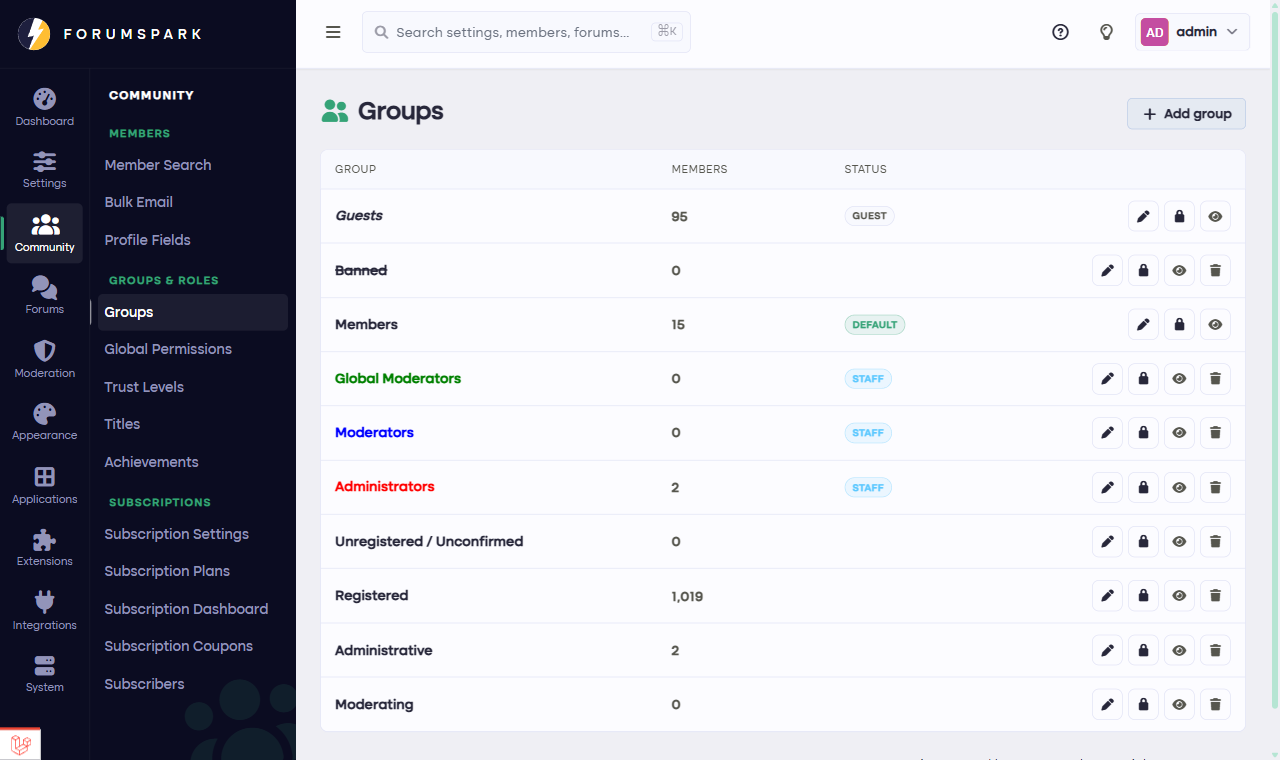
Community, then Groups: every group on your board.
The groups you start with
A new board has the essentials: a guest group for visitors, a default group new members join automatically, and your staff groups. Which group plays the guest and default roles is set in Configuration, then Settings; the groups themselves are shaped here.
What a group carries
Identity: a name, and a username style so the group's members stand out in topics and member lists. The style builder lets you pick colors, an icon and effects with no code, so your moderators can glow the way moderators should.
Forum access: which forums the group sees, reads and posts in, managed per forum in Community, then Forum Access. This is the mechanism behind staff rooms and member-only lounges.
Feature permissions: what the group may do across the board, from posting attachments to using the shoutbox.
Members can hold several groups
A member can be in the default group, a VIP group and the event team all at once, and gets the sum of the permissions. That's the intended pattern: keep the default group ordinary, and layer smaller groups with extras on top of it.
Design groups around what people may do, not around status. If a group exists only as a badge, a rank or achievement might serve better; groups earn their keep when permissions differ.