

Connect a custom domain
Your board is born at yourname.forumspark.net, but it doesn't have to live there. Connecting your own domain, forum.yourcommunity.com or the whole yourcommunity.com, works on every plan and takes a few minutes plus one DNS change.
yourboard.forumspark.net/admin/domains
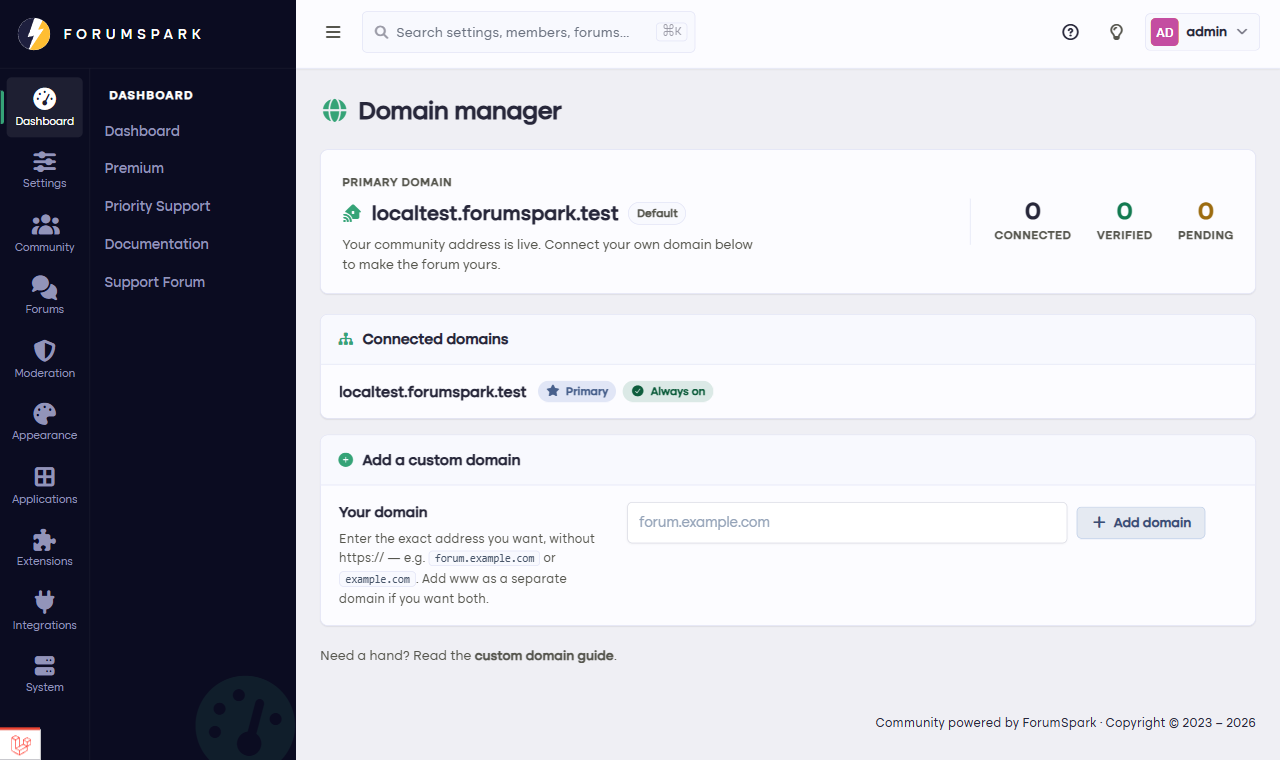
Overview, then Domain Manager.
The steps
Buy a domain anywhere you like, if you don't own one yet. Any registrar works.
In Overview, then Domain Manager, add your domain. The page shows you the exact DNS record to create.
Create that record at your registrar. This is one copy-paste into their DNS settings; the page's instructions match what registrars call things.
Wait for verification. DNS changes take anywhere from minutes to a few hours to travel; the Domain Manager checks and confirms.
Set the domain as primary once verified. Your board now answers on your domain, and the old forumspark.net address quietly redirects, so no link ever breaks.
Security certificates are handled for you automatically; your domain gets HTTPS without any certificate shopping.
Do this early if you're going to do it. Every day on your own domain builds your search presence at your address instead of ours, and members' bookmarks never need to change again.