

Theme Studio basics
Theme Studio is where your board gets its look: colors, typography, spacing, your logo, all edited live with your actual board in front of you. You'll find it through Appearance, then Themes, where every theme has an edit button that opens the Studio.
yourboard.forumspark.net/theme-studio
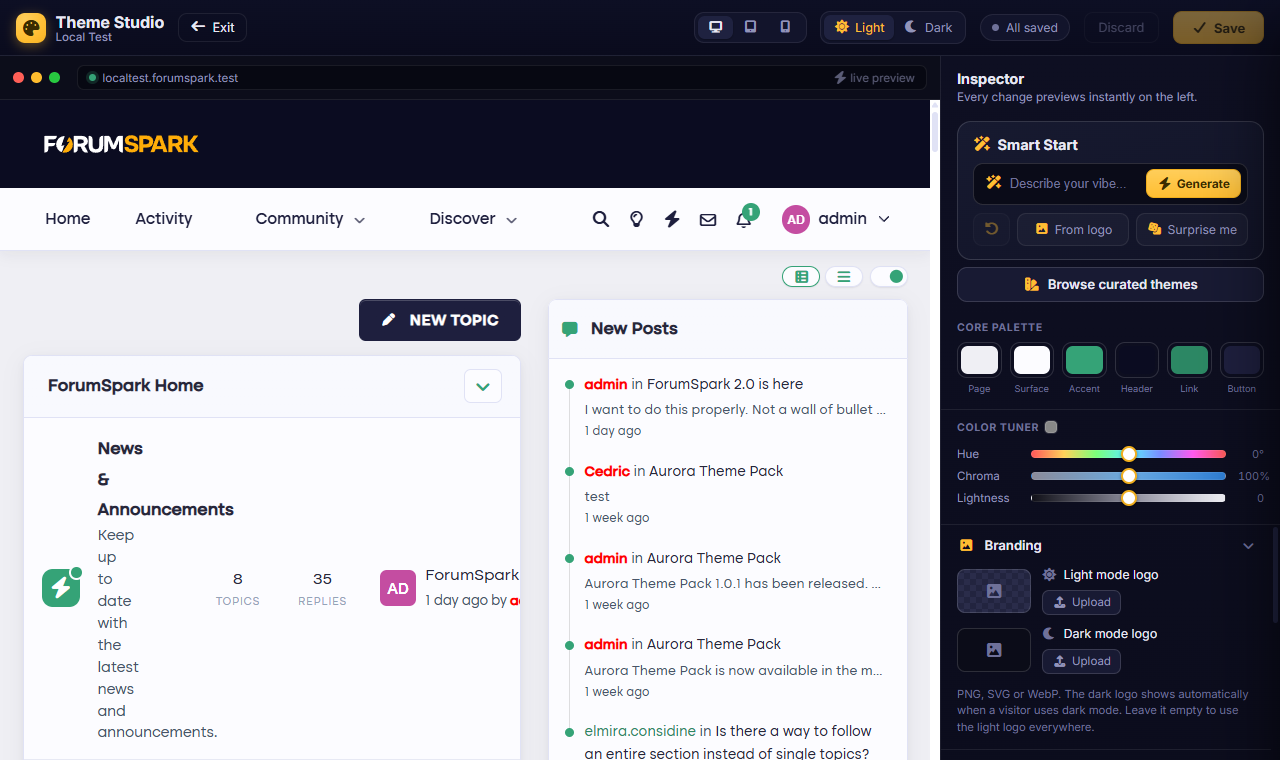
The Studio: settings on one side, your real board on the other.
How it works
The Studio shows your board as a live preview, and every change you make lands on it instantly. Nothing is saved until you say so, which makes the Studio a safe place to play: try a wild accent color, hate it, and leave without saving. Your members never saw a thing.
Colors drive the whole board: backgrounds, panels, links, accents. Change a handful of colors and the board follows everywhere, because the design is built on them.
Your logo and images: the board logo, forum markers, the little statistics icons. Upload once, used everywhere.
Layout choices like how posts are presented, classic with the member rail or as modern cards.
Custom CSS, for when you know exactly what you want. Optional, and everything else works without ever opening it.
Themes, plural
A board can have several themes: your main look, a seasonal variant, an experiment in progress. Appearance, then Themes lists them all; one is the default your visitors get. You can work on a new theme in the Studio for as long as you like and only make it the default when it's ready.
Fastest way to a good-looking board: set your logo, pick two colors you actually like (one background mood, one accent) and let the Studio spread them. Ten minutes, honestly.