

Trust levels
Trust levels are the board's memory of who has shown up: a ladder members climb automatically by participating, from brand new to established regular. No applications, no favoritism, just presence over time.
yourboard.forumspark.net/admin/trust-levels
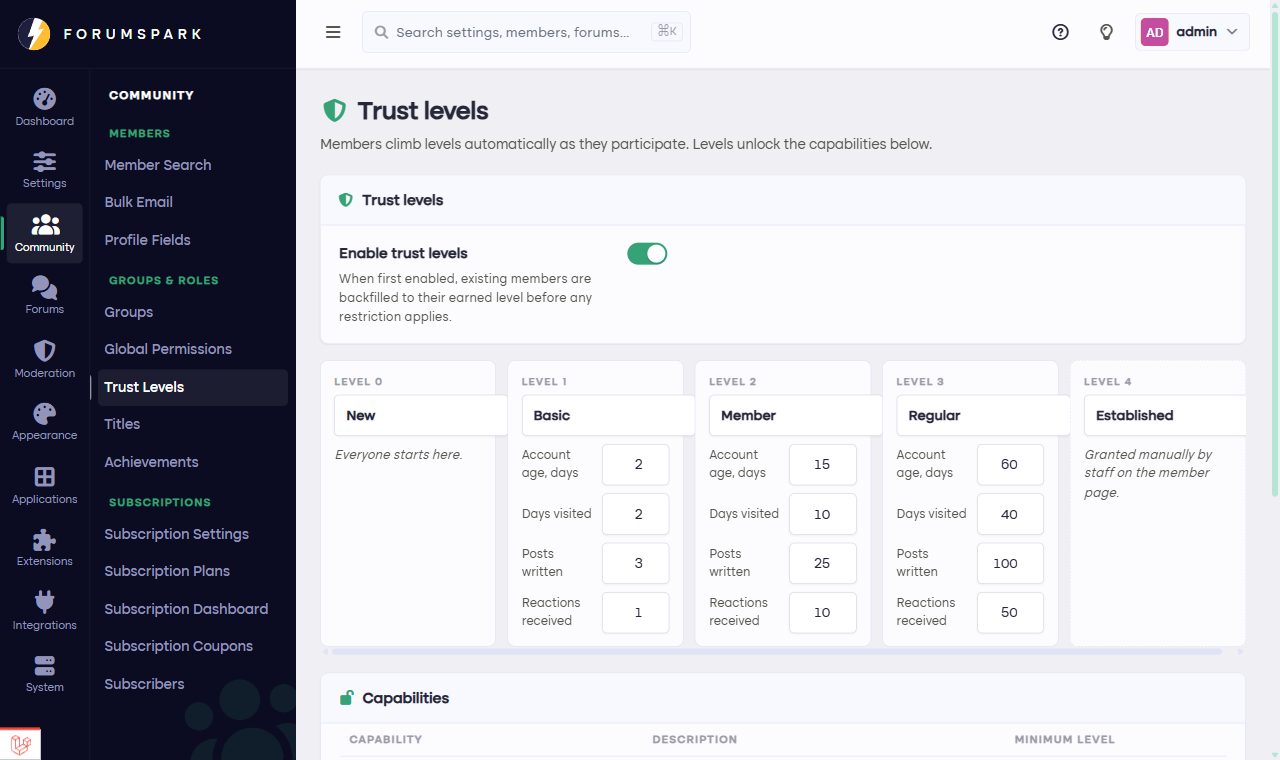
Community, then Trust Levels: the ladder and its rungs.
How the ladder works
There are five levels, from New up to Established. Members advance by simply being members: visiting, reading, posting, participating over time. The thresholds for each rung are yours to tune in Community, then Trust Levels, and each member's current level shows on their profile with a friendly explanation of how the ladder works.
What levels are for
Gates. Some things can require a minimum level, which quietly ends most new-account mischief: the account that registered today can't do the things that need a week of showing up.
Recognition. The level on a profile tells everyone at a glance whether they're talking to a newcomer or a fixture of the community, which changes conversations for the better.
Template material. The member's trust level is available as a variable in Custom Templates, so you can surface it on the post rail or anywhere else.
Enabling trust levels on an established board is fair from day one: existing members get credit for their history, so your veterans arrive on the ladder where they belong instead of starting at New.
Tune thresholds to your board's rhythm. A slow, cozy board should need fewer posts per rung than a firehose gaming community; the ladder should feel climbable by a normal engaged member within a season.