

How templates work
Custom Templates is the deepest customization layer your board has: it lets you rewrite the actual building blocks of the board, the member box beside posts, the topic rows, even whole pages, using safe templates with documented variables. This guide is the five minute mental model; the next guides are hands-on.
yourboard.forumspark.net/admin/custom-templates
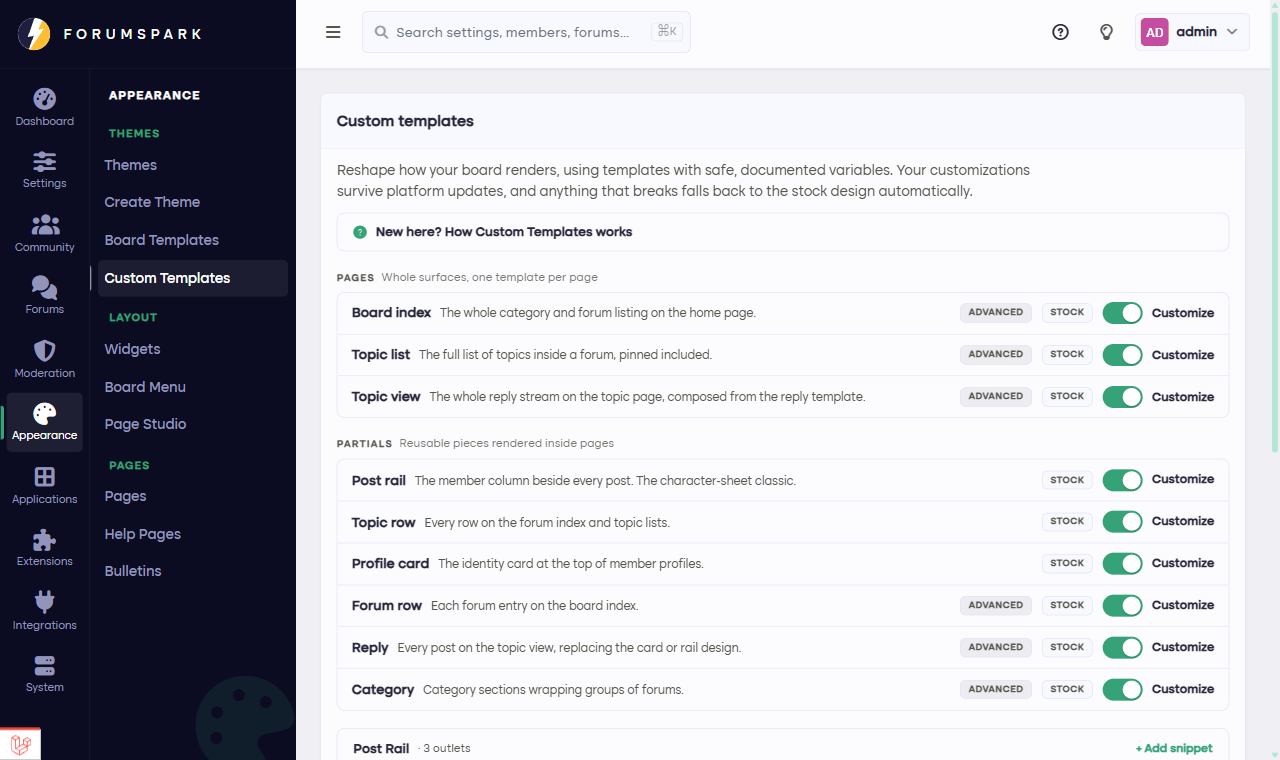
Appearance, then Custom Templates: every surface you can reshape, in one list.
The five words that explain everything
A surface is a part of the board you can reshape: the post rail, a topic row, the profile card, or in Advanced mode a whole page.
A template is the blueprint for a surface: HTML plus placeholders.
A variable is a placeholder like the member's name or a post count. When the page renders, it becomes the real thing. Every surface shows you its full list of variables right in the editor.
Stock is the built-in design. It's what renders until you customize, and what everything falls back to.
A partial is a small template reused inside bigger ones, like the topic row inside the topic list page.
Why it's safe to play
Three promises make this a sandbox rather than a minefield. A broken template never reaches your members: the stock design steps in automatically and you get a notice in the admin panel. Every save keeps a restorable version. And platform updates never overwrite your work; if we improve a stock design you've customized, yours keeps rendering and you just get a friendly review offer (there's a whole guide on that: When the stock design updates).
Ready to try it? The next guide, Your first customization, has you changing something real in about two minutes.