

Ad Manager
Ad Manager lets you sell banner space on your board to your own members. You decide where banners can go and what a spot costs, members order and upload their banner, you approve it, and they pay you directly. Advertisers follow their own views and clicks, so you never have to send reports.
yourboard.forumspark.net/admin/advertising
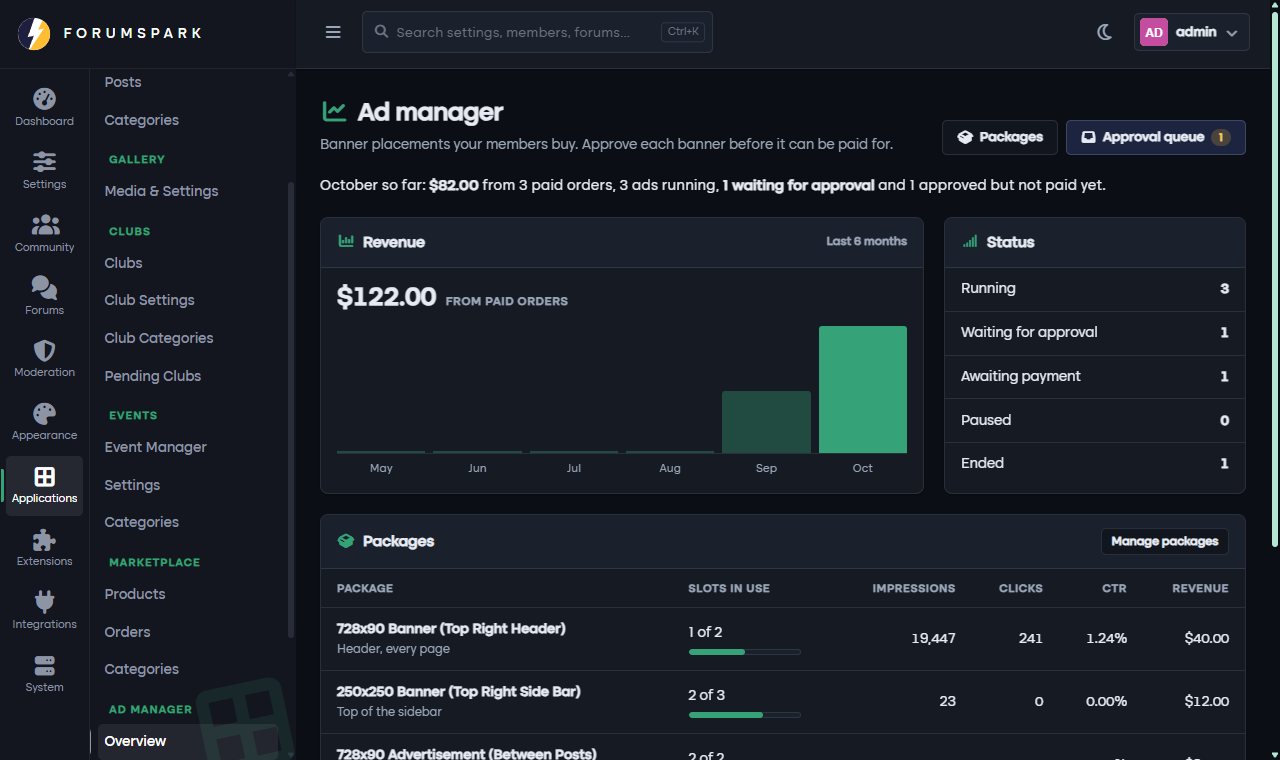
The overview: this month's revenue, what is running and how each package performs.
Where to find it
Ad Manager is part of the Earn and Scale plans, so there is nothing to install. In your admin panel, open Applications and you will find it with five pages: Overview, Approval Queue, Packages, All Ads and Settings.
Payments use the same Stripe or PayPal account as the Marketplace, connected under Monetization, then Payment Providers.
Packages: what you sell
A package is one spot on your board with a price. Give it a clear name, for example 728x90 Banner (Top Right Header), so members know exactly what they are buying. For each package you choose:
Where it shows: below the header, above or below the forum list, between posts in topics, at the top of the sidebar, or above the footer.
The banner size. Each spot suggests a standard size, and you can change it.
How it is sold: in blocks of days, views or clicks that you define, for example 30 days or 10,000 views, with a price per block and the most a member can buy at once.
How many ads can run at the same time in that spot. When several run, they take turns.
Optional forums, if the banner should only appear in certain forums.
Guidelines members see before they order, and whether an "Advertise here" link shows under the banner.
A spot nobody has bought simply shows nothing. There are no placeholder ads and no outside ad networks.
How a member orders
They open Advertise from their user menu, right under View profile, and see your packages with prices and free spots.
They place an order: a name for the ad, the banner image (and an optional sharper version for high resolution screens), alt text, the link it should open and how much they want to buy.
You review it in the Approval Queue. Automatic checks show whether the size and file are right, and you can approve, ask for changes or reject with a short message.
They pay once you approve. Nothing is charged before that, and the ad starts running as soon as the payment comes through.
Advertisers follow their banners under My ads: views, clicks, click rate and how much is left, with options to pay, fix and resubmit, or renew when an ad ends.
Settings
Accept new orders pauses ordering without touching ads that are already running.
Who can buy ads limits ordering to the groups you pick.
Hide all ads for gives groups an ad-free board, for example your staff or supporters.
Unpaid approvals expire after frees a spot when an approved ad is not paid in time.
Between posts and Repeat every decide after which post the first in-topic banner appears and how often it repeats.
Advertising terms are shown to members, who accept them when they order.
Banners are images only. Members cannot add code or scripts to your board, and every banner goes through you before it appears.